

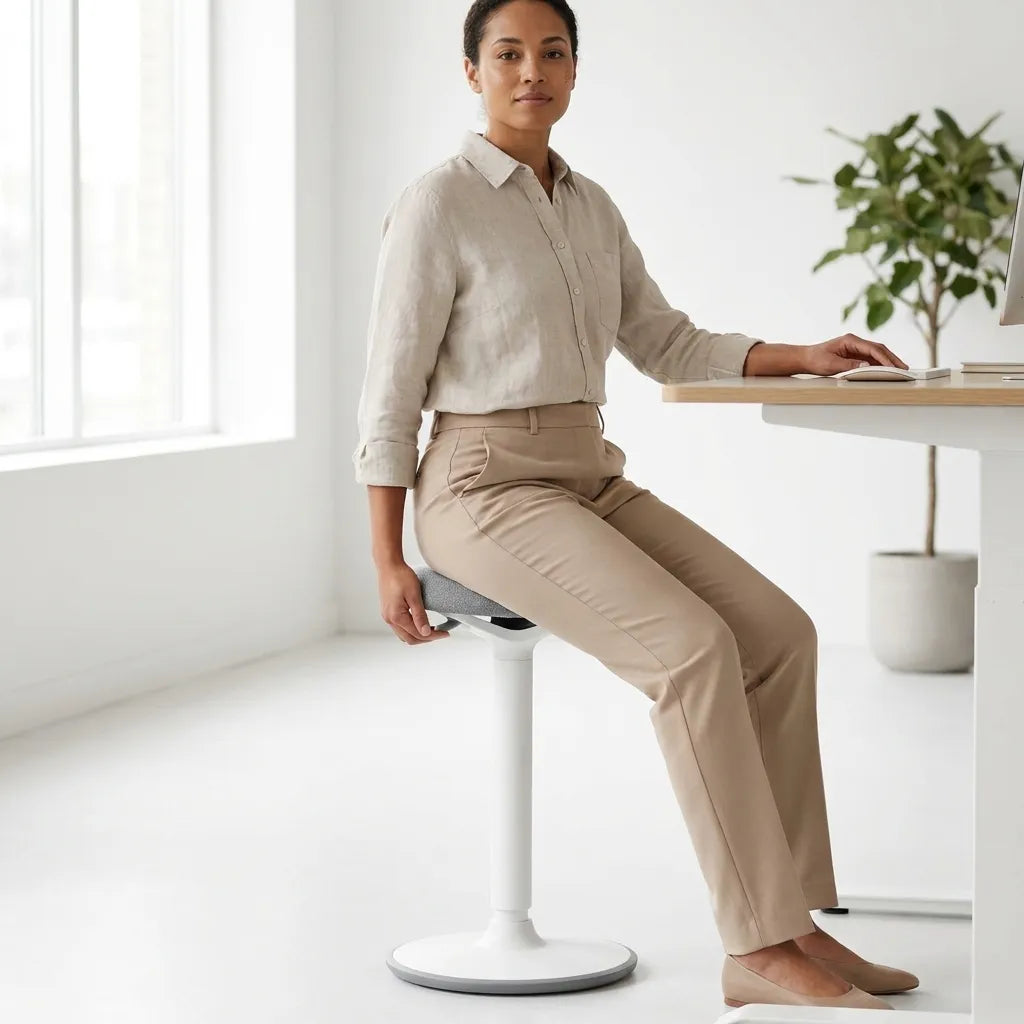
How to Use a Balance Stool at a Standing Desk

In this article
A balance stool works best as one position in a varied workday, not as a replacement for every chair or as a reason to stay still for hours. Set it so your feet are supported, your hips feel comfortably open and your desk meets your hands without lifting the shoulders. Then use it for tasks that benefit from easy movement and switch positions before fatigue builds.
The right setup is personal. Stool height, body size, footwear, desk height and the task all affect the result. The goal is not to hold a perfect pose. It is to create a stable starting position that allows small, voluntary changes while keeping your work within comfortable reach.
Quick answer: use the stool as a third position
Think of a balance stool as a position between a supported office chair and standing. It may suit short periods of reading, calls, light computer work or transitions between seated and standing tasks. Keep a conventional chair available when you need a backrest, longer support or precise work.
The Canadian Centre for Occupational Health and Safety, or CCOHS, encourages variation among sitting, standing and semi-standing postures. Its guidance does not prescribe one ideal position for the whole day. That principle is the most useful way to introduce an active stool.
Start with a clear, stable area
Place the stool on a level, firm surface where its base can remain fully supported. Remove loose cables, boxes and floor objects from the area used by your feet. Leave enough room to approach the stool, rotate gently and stand without catching the desk frame or a nearby cabinet.
Check the floor and the stool base for dust or moisture that could reduce grip. If you use a rug, confirm that the entire base sits evenly and that the edge cannot fold under it. Do not improvise with a platform or unstable mat to change the height.
Set the stool height before the desk
Begin with both feet on the floor and the seat supporting your weight without pressure behind the thighs. Your knees may be somewhat more open than on a conventional chair, but you should not need to point the toes or hang from the seat. If your feet cannot rest securely, lower the stool or use a suitable foot support only when the manufacturer permits it.
After the stool feels stable, bring the adjustable desk to the task. For keyboard and mouse work, keep the shoulders relaxed and the elbows near the body. The hands should meet the input devices without bending the wrists sharply upward or reaching forward. The balance stool height guide offers a more detailed measuring method.
Use your feet as active support
A balance stool does not remove the need for stable foot contact. Place the feet far enough apart to control small movements without gripping the floor with the toes. Keep them where you can stand smoothly. Avoid wrapping the feet around the stool column or tucking both feet behind the base.
Change foot position occasionally. You may move one foot slightly forward during reading, return to a symmetrical stance for typing and then stand. These are modest changes, not exercise challenges. If the stool tips, slides or requires constant muscular effort to control, stop and reassess the surface and height.
Match the stool to suitable tasks
Good starting tasks
Begin with low-pressure tasks that do not require long, uninterrupted concentration. Short calls, email review, planning, light reading or a brief computer session let you notice how the setup feels. Keep the first sessions short and increase time only if comfort and control remain good.
Tasks that may favour a chair
Detailed design, sustained data entry, long meetings and work that benefits from a backrest may be easier in an ergonomic office chair. A stool can complement that chair without replacing its support. The comparison of an active sitting stool and ergonomic chair explains the tradeoffs.
Tasks that may favour standing
Brief collaboration, sorting materials and movement breaks may feel more natural while standing. Raise the desk only after you have stepped clear of the stool, then park it outside the desk's moving path.
Coordinate monitor, keyboard and mouse
A higher seat changes the relationship between your eyes, hands and screen. Recheck all three. The screen should be easy to view without lifting the chin, while the keyboard and mouse remain close enough that the upper arms stay near the body. Do not solve a low screen by raising the entire desktop if that forces the hands too high.
If you alternate frequently, save separate seated, perched and standing heights when your desk controller supports presets. Label the positions mentally or in your routine. Always confirm that the stool, chair arms and nearby furniture remain clear before moving the desk.
Build a gradual transition
There is no universal schedule. Start with a brief interval, then change to a familiar chair or stand. Notice pressure under the seat, foot stability, shoulder position and whether you are leaning on the desk. Increase use gradually only when the stool remains comfortable and your work quality does not decline.
CCOHS notes that alternative chairs can help some people vary posture, but no single chair suits every person or task. A new sensation is not proof of benefit, and discomfort is not something to push through. Persistent pain, numbness, weakness, dizziness or balance concerns deserve appropriate professional advice.
Use movement without turning it into instability
Small shifts can help you avoid a fixed posture, but large rocking motions are unnecessary during computer work. Keep the stool within its intended range and follow its instructions. Never use it as a step, lean beyond the base or sit on the edge in a way that compromises support.
When you need a bigger change, stand up and walk briefly. The purpose of an active workstation is to make changes easier, not to perform every movement while seated. The guide on when to sit or stand at a standing desk can help organize tasks around different positions.
Plan safe transitions
- Place both feet securely before sitting or standing.
- Keep one hand near the desk only for light orientation, not to pull yourself onto the stool.
- Stand fully before moving the stool.
- Park it where the desk, chair and walking route cannot strike it.
- Check the full desk travel with the stool removed from the moving area.
- Return the stool only after the desk reaches the intended height.
If several people share the workstation, each person should reset both stool and desk rather than assuming the previous height will work. A visible pre-use check is more reliable than copying someone else's settings.
Common mistakes
Using the stool all day immediately
New loading and balance demands are easier to assess in short sessions. Increase exposure gradually.
Letting the feet dangle
Stable foot support helps control the stool and reduces pressure behind the thighs.
Raising the desk before the seat is correct
Set the body and stool first, then bring the work surface to the hands.
Forcing constant motion
Active sitting permits small changes. It does not require continuous rocking.
Removing the regular chair
Different tasks benefit from different support. Keep options available.
Practical setup checklist
- Use a level, uncluttered floor area.
- Set stool height with both feet supported.
- Adjust the desk for relaxed shoulders and close reach.
- Recheck monitor height from the higher seated position.
- Start with short, low-pressure tasks.
- Switch to a chair or standing before fatigue becomes pronounced.
- Move the stool clear before adjusting desk height.
- Stop if the setup feels unstable or causes persistent symptoms.
Final recommendation
Use a balance stool to add one more comfortable option to your workstation. Begin with secure feet, a stable base and a desk height matched to the task. Alternate with a supportive chair, standing and short walks rather than chasing one ideal posture.
The current Burotic Balance Stool page provides the verified product details and available options. Compare those details with your body, desk range, floor and intended tasks before adding it to your routine.
Sources: CCOHS, Working in a Sitting Position: Basic Requirements; CCOHS, Alternative Chairs; CCOHS, Sit/Stand Desk.
Previous article
How Much Legroom Do You Need Under a Desk?
Next article
How to Clean and Maintain a Laminate Desk Top