

Should Your Desk Face a Wall or the Room? A Layout Guide

In this article
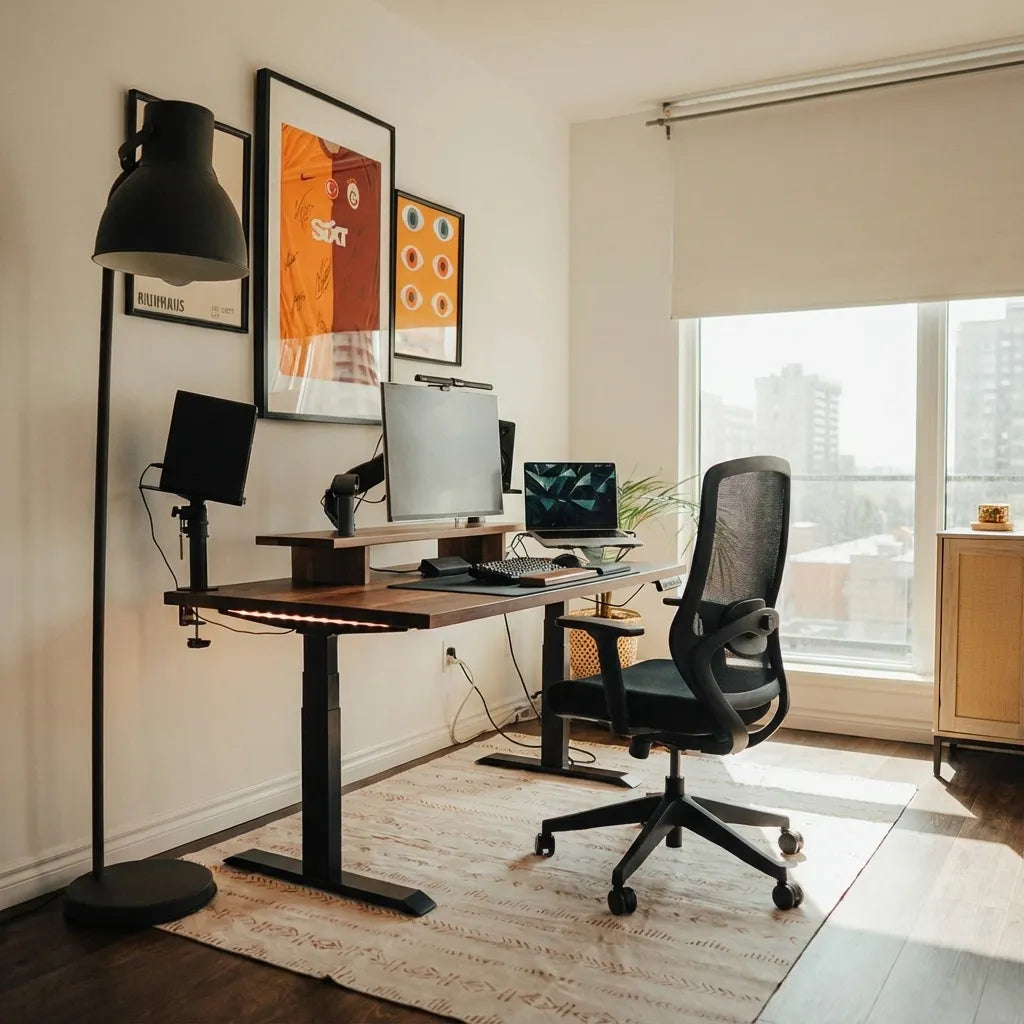
A desk facing a wall usually saves floor space, simplifies cable routing and reduces visual distraction. A desk facing the room can feel more open, provide a stronger video-call background and let the user see the door, but it needs more circulation space and more deliberate cable management. Neither direction is universally better.
The best orientation follows the room, the work and the moving parts of the workstation. Screen glare, window position, privacy, door swing, chair travel and adjustable desk clearance matter more than a decorating rule. Before moving heavy furniture, test both layouts with tape and a temporary screen position.
Quick comparison
Facing the wall
This position generally keeps the desk perimeter compact and makes outlets easier to reach. It can support focused work and keep the centre of a small room open. The tradeoffs are a close visual boundary, a possible view of a blank wall and a background that may show the entire room during video calls.
Facing the room
This position can create a defined office zone and make the wall behind the chair available as a controlled background. It may also let the user see people entering. The tradeoffs are visible cables, a larger footprint and potential glare from a window or bright light behind the screen.
Start with the work, not a design trend
List the tasks performed at the desk. Focused writing may benefit from fewer visual distractions. Frequent calls may make the camera background important. Confidential work may require screen privacy. Creative work may benefit from a longer view across the room. Let the dominant task lead, then solve the practical constraints.
CCOHS recommends considering acoustical and visual privacy, natural light, interpersonal contact, equipment, storage and movement when planning office space. Its office working-space guidance supports a whole-room decision rather than a single preferred direction.
Evaluate windows and screen glare
A screen directly in front of a bright window can create high contrast. A window directly behind the user can reflect in the screen and create strong backlighting on video calls. A side window often gives more controllable daylight, although blinds or curtains may still be necessary as the sun changes.
Test the room at the hours when it is normally used. Move a dark screen or mirror-sized board into the proposed position and look for reflections. The CCOHS guidance on monitor positioning recommends placing screens to avoid glare and keeping them at a comfortable distance and viewing angle.
If the window is the deciding factor, the guide on placing a desk in front of a window compares view, daylight, heat and privacy in more detail.
Protect circulation and door clearance
A desk against a wall leaves a simple rectangle in the room. Turn it outward and the chair may move into the main path. Measure the desk, base feet and chair fully pulled back. Open the room and closet doors. Walk from the entrance to storage without asking the seated person to move.
Do not place an adjustable desk where a raised monitor can meet a door, shelf or window hardware. Keep emergency routes and required accessible paths clear. Applicable building and fire requirements take priority over a preferred aesthetic.
Think through the video-call view
Facing the room often puts a wall behind the user, which can create a simple background. Check what the camera actually captures, including doors, reflective surfaces and household activity. A background should not expose confidential material or force other people to avoid the room.
Facing the wall can still work well for calls if the camera angle is controlled or a virtual background is appropriate. Avoid placing a bright window directly behind the head. A small front or side light is usually easier to manage than relying on overhead light alone.
Plan cables before rotating the desk
Against a wall, power and data cables can often travel a short protected route. Facing the room, the cables may cross open floor or become visible from the entrance. Do not solve that problem with loose extension cords under a rug.
Locate outlets first. Keep wall-side cables fixed and give the moving desktop a managed service loop. Run the desk through its full range while watching every cable. The standing desk cable management guide explains how to separate fixed and moving segments.
Use the wall without crowding the desk
A wall-facing layout can support shelves, art, acoustic panels or a task light, but fixed objects must clear the moving workstation. Measure the highest point of the monitor and monitor arm at maximum desk height. Keep shelves out of the collision path and avoid storing heavy objects where they could fall onto equipment.
Leave visual breathing room. A blank wall does not need to be filled with accessories. One useful shelf or a calm piece of art may support the space better than a dense display that competes with the screen.
Consider focus, privacy and awareness
Some people focus better with a quiet wall in front of them. Others feel uncomfortable with their back to a door. These reactions are individual and can change with the type of work. Test the position during a real work block rather than relying on a diagram.
If seeing the door matters, a small mirror or a slightly angled desk may solve the issue without placing the entire workstation in the room. If visual distraction is the concern, use a screen, curtain or task zone rather than assuming the wall is the only answer.
Account for sound and shared living
Desk direction changes how speech travels. A person facing a hard wall may hear more reflected sound, while a desk facing the room may project calls into the household. Rugs, curtains, books and acoustic materials can reduce harsh reflections, but they should not block vents or moving equipment.
In a bedroom or multipurpose room, consider what remains visible after work. A wall-facing desk can keep the centre open, while a room-facing desk can create a strong boundary between work and rest. The guide on desk placement in a bedroom or small office covers these tradeoffs.
Test both directions in seven steps
- Measure the room, doors, windows, outlets and fixed storage.
- Mark the desktop and base feet in the wall-facing position.
- Add the chair at work position and fully pulled back.
- Repeat the marks with the desk facing the room.
- Place a screen-sized object and check glare morning and afternoon.
- Trace a safe cable route and test the desk at maximum height.
- Work in each orientation for at least one normal task block.
Photograph both arrangements from the doorway and from the camera position. The images reveal clutter, sightlines and cable exposure that may be less obvious while standing in the room.
When a diagonal or perpendicular layout works better
The decision is not limited to wall or room. A desk perpendicular to the wall can receive side light, maintain a view into the room and preserve part of the wall for storage. A diagonal arrangement can soften an awkward corner but usually consumes more floor area and complicates cables.
Use these alternatives only when they solve a real constraint. In a small room, the simplest rectangular footprint is often the most flexible. In a larger room, a perpendicular desk can define zones without building a partition.
Choose the desk after confirming the footprint
Desktop width and depth determine whether an outward-facing layout remains practical. A custom Burotic standing desk can address a measured footprint, while the active Aspire Wood Laminate Standing Desk offers current standard configurations. Confirm present dimensions and options on the product pages.
Do not order around a visual mockup alone. Include the base, chair, monitor arms and cable route. If the room may change, favour a layout and size that can rotate without blocking doors or requiring new electrical work.
Final recommendation
Face the wall when compactness, simple cables and reduced distraction are the priorities. Face the room when awareness, a controlled background and a sense of openness matter more, and the room can support the larger footprint. Use a perpendicular position when side light and circulation make it the better compromise.
The final choice should survive a practical test: no glare, no blocked route, no strained cable and no collision at standing height. If both directions pass, choose the one that makes the dominant work easier and the room simpler to share.
Sources: CCOHS, Space Requirements for Office Work; CCOHS, Monitor Positioning; CCOHS, Lighting Ergonomics Checklist.

Previous article
Should You Wear Shoes at a Standing Desk? Comfort and Safety Guide
Next article
Where Should You Position a Monitor Arm on Your Desk?