

How Many Power Outlets Does a Home Office Need?

In this article
A home office needs enough outlets for every device that is normally powered, plus a small amount of spare capacity for occasional equipment and bulky adapters. For many single-person setups, that means counting six to ten connection points, but the correct number comes from an equipment list and the electrical capacity of the circuit, not from a universal rule.
An outlet count is only the beginning. You must also distinguish wall receptacles from positions on a power bar, AC outlets from USB charging ports, and convenience from safe electrical capacity. A power bar creates more connection points; it does not create more power for the branch circuit.
Quick method: count, classify and add headroom
- List every device that stays connected during a normal workday.
- Mark high-draw equipment and devices with large power adapters.
- Count occasional items such as a camera charger or label printer.
- Decide which devices can use USB-A or USB-C instead of AC adapters.
- Add one or two convenient spare positions, not an unlimited expansion.
- Verify ratings, certification and circuit suitability before use.
If the plan requires power bars connected to power bars, extension cords as permanent wiring or repeated unplugging of essential devices, the room may need an assessment by a qualified electrician rather than another adapter.
Build an honest device inventory
Start with the computer, monitor or monitors, laptop dock, desk motor, task light, phone charger, speakers, printer, router, external drives and any camera or audio equipment. Do not count only what is visible on the desktop. Devices mounted underneath or stored nearby still draw from the same supply.
Separate the list into three groups. Continuous devices stay connected most of the day. Intermittent devices operate occasionally, such as a printer. Charging devices may move in and out. This classification helps reserve accessible outlets for temporary equipment while keeping permanent plugs away from foot traffic.
Why six to ten connections is only a starting range
A simple laptop station might use power for the laptop, one monitor, desk, lamp and phone, which is five connections. Add a dock, second monitor, speakers, printer and camera charger and the count reaches ten. Some USB-powered devices may reduce AC plug demand, while large adapters can block adjacent outlets and increase the physical space required.
Do not select a power product merely because its advertised outlet count equals the device count. Consider plug orientation, adapter width, cable direction, switch access and whether a charger must remain visible. Leave at least one practical spare position if the ratings and circuit allow it.
AC outlets and USB ports are not interchangeable
A USB port may charge a phone or accessory, but its connector type and power output must meet the device's requirements. USB-A and USB-C describe the physical interface, not a guaranteed charging speed. Follow the device and charger instructions, and use an appropriate cable.
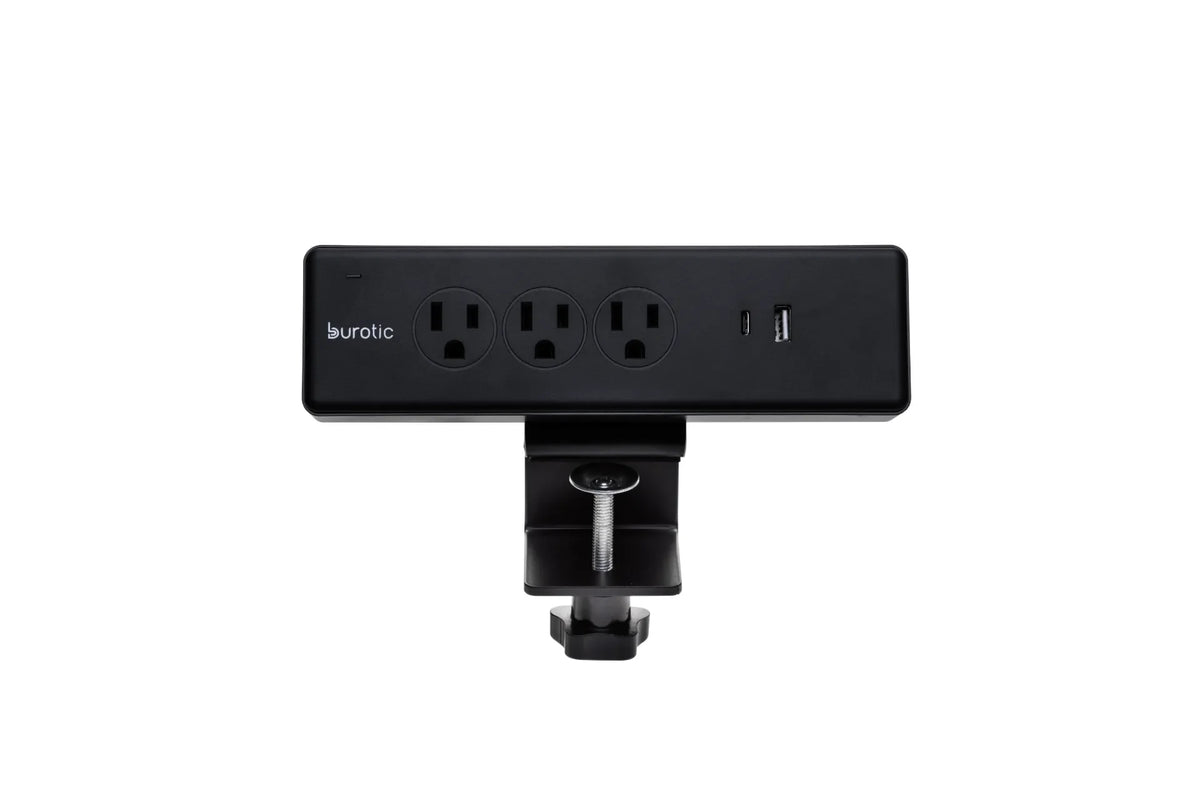
The current Burotic Power Bar page lists three AC outlets, one USB-A port and one USB-C port, with both on-desk clamp and under-desk versions. It also lists a maximum rating of 1875 W. Those are product specifications, not a recommendation to load every port simultaneously without checking the connected devices and circuit.
Understand circuit capacity
Every receptacle in the room may not be on a separate circuit. Several wall outlets and lights can share one branch circuit. A power bar does not increase that circuit's capacity. High-demand heating appliances, portable air conditioners, kettles and similar loads should not be added to an office power arrangement without checking appropriate electrical guidance.
If breakers trip, plugs feel hot, outlets are loose or discoloured, lights flicker or equipment behaves unusually, stop using the affected setup and seek qualified advice. Do not solve those signs by adding another power bar or replacing a breaker yourself.
Choose products approved for Canada
Health Canada advises consumers shopping online to look for a Canadian certification mark such as CSA, cUL or cETL on electrical products, and warns that a CE mark alone does not indicate approval for sale in Canada. Verify the mark on the product or authorized documentation rather than assuming a listing is sufficient.
Use electrical products according to their labels and instructions. Inspect cords and plugs before use, keep liquids away and replace damaged equipment. If the product information is unclear, contact the manufacturer or retailer before connecting valuable electronics.
Power bar or surge protector?
A basic power bar provides additional connection points. A surge protector is designed to limit certain transient overvoltage events, but products vary and no device protects against every event. Read the label and specifications rather than assuming every bar includes surge protection.
The power bar versus surge protector guide explains the distinction. The Government of Canada also recommends protecting sensitive electronic equipment with an appropriate surge-protecting bar when preparing for power outages. Replace protection devices according to manufacturer instructions, especially after a significant event or when status indicators show a fault.
Never daisy-chain power bars
Do not plug one power bar, extension cord or multi-outlet device into another to gain more positions. Daisy chaining can overload equipment, create poor connections and place cords where they are easily damaged. Plug the bar directly into an appropriate wall receptacle as its instructions require.
Extension cords are temporary tools, not a substitute for permanent wiring. If the office routinely needs a cord across a doorway or under a rug, ask a qualified electrician about a safer permanent solution. Never route power cords where chair casters, desk legs or doors can crush them.
Plan for a standing desk
A height-adjustable desk changes the cable problem because the desktop and attached devices move. Decide whether the power bar travels with the top or remains fixed. A desk-mounted bar can reduce the number of device cords that must travel to the floor, but its main supply cord still needs enough controlled slack for the full height range.
Set the desk at its highest position with power disconnected and inspect the route. Then check the lowest position. Nothing should become taut, loop into the frame or touch a pinch point. The desk power-bar setup guide and standing-desk cable-management guide provide detailed checks.
Keep power separated from liquids and heat
Do not place a power bar directly under a drink zone, humidifier or plant. Keep ventilation openings clear and do not cover adapters with paper or fabric. Large adapters may release heat during normal use and need appropriate space.
Mounting a product under the desk can free surface space, but it must remain accessible for inspection and disconnection. Follow the manufacturer's approved mounting method. Do not drill into, glue or modify an electrical enclosure.
Sample count for common setups
Basic laptop station
- Laptop adapter
- One external monitor
- Desk motor
- Task light
- Phone or headset charging
This may require about five active connections, depending on whether USB charging is integrated.
Expanded knowledge-work station
- Laptop dock or desktop computer
- Two monitors
- Desk motor
- Task light
- Speakers
- Phone and headset charging
- Printer or occasional charger
This can reach eight to ten connections. The example does not confirm circuit capacity. Use it only to build your inventory.
Final checklist
- Count every connected device and large adapter.
- Reserve one or two accessible spare positions.
- Confirm USB output against device requirements.
- Check the power product's rating and Canadian certification.
- Plug the bar directly into an appropriate wall receptacle.
- Keep cords away from wheels, pinch points, heat and liquids.
- Test cable travel at the highest and lowest desk positions.
- Seek qualified help for tripping, heat, damage or inadequate permanent wiring.
Final recommendation
Plan connection points from your actual equipment list, then add modest headroom. A typical home office may use six to ten connections, but the correct solution must also respect plug size, device loads, product ratings, circuit capacity and Canadian certification.
If the count exceeds a safe, clean arrangement plugged directly into the wall, do not keep expanding with adapters. A qualified electrician can determine whether the room needs more permanent receptacles or a different circuit plan.
Sources: Health Canada, Buying Electrical Products Online, updated February 2, 2026; Health Canada, Electrical Product Safety; Government of Canada, Preparing for Power Outages, updated March 12, 2026.



Previous article
How Much Should You Budget for a Home Office in Canada?
Next article
How to Mount a Laptop Beside a Monitor at a Standing Desk