





Do You Need a Grounded Outlet for a Home Office Power Bar?
A three-prong power bar should be connected to a properly grounded three-slot receptacle. Learn why the ground pin matters, what not to do with an older two-slot outlet and which other safety checks belong in a home office.

In this article
Yes. If your home office power bar has a three-prong plug, connect it to a properly grounded three-slot receptacle. Do not remove the ground pin and do not use a three-prong-to-two-prong adapter to make it fit an older outlet. Health Canada states that the third prong reduces the risk of electric shock and warns against these adapters.
A power bar can add convenient receptacles, but it cannot create grounding where none exists. It also cannot repair damaged wiring, increase the capacity of the branch circuit or make a high-load appliance suitable for a shared office circuit.
What the third prong does
The round or U-shaped third pin is the equipment grounding connection. Under a fault condition, grounding provides a path intended to help protective devices operate and reduce shock risk. It is a safety feature, not an optional alignment pin.
The presence of three slots alone does not prove that an outlet is correctly wired. If you suspect an old, loose, damaged or improperly grounded receptacle, stop using it and contact a licensed electrical contractor. Do not rely on a plug-in gadget as a substitute for professional assessment when wiring is in question.
Can you use a three-prong power bar with a two-slot outlet?
Not by cutting off the ground pin or adding a so-called cheater adapter. Health Canada explicitly advises against both. Ontario's Electrical Safety Authority also identifies missing third prongs and two-to-three-prong adapters as signs of inadequate grounding and recommends consulting a licensed electrical contractor when wiring needs updating.
The safe solution is not to force compatibility. Have the outlet and circuit evaluated, then use equipment that matches an approved installation. This is especially important in older Canadian homes where receptacle appearance and wiring history may vary.
Grounding is different from surge protection
A grounded power bar and a surge protector are not automatically the same product. Some power bars simply provide multiple outlets, while a surge protector includes components designed to limit certain voltage spikes. Read the label and instructions for the exact model instead of assuming protection from the shape, number of outlets or USB ports.
Our comparison of a power bar, surge protector and extension cord explains the categories. Even a surge protector still needs to be used according to its instructions and connected to a suitable receptacle.
What devices belong on a home office power bar?
The Electrical Safety Authority describes power bars as useful for lower-demand home or office devices such as electronic chargers and lighting. It warns against using them for relatively high-load appliances such as portable space heaters, microwaves, vacuum cleaners, toasters or irons.
Before connecting monitors, computers, chargers or accessories, check the electrical rating on the power bar and on the connected equipment. The total load must remain within the product rating and the circuit capacity. Our guide to home office power bar capacity shows how to collect the necessary ratings without guessing.
Seven checks before plugging in
- Inspect the receptacle. Do not use one that is cracked, loose, discoloured or warm.
- Confirm the plug fits normally. Never alter a prong or force the plug.
- Read the power bar rating. Check voltage, current and maximum load.
- Look for an approved certification mark. Use electrical products approved for sale and use in Canada.
- Inspect the cord. Replace a product with fraying, cuts, crushed sections or a damaged plug.
- Keep it dry and ventilated. Do not cover the unit or route its cord near heat or water.
- Keep high-load appliances separate. A space heater does not belong on an office power bar.
Do not daisy-chain power bars
Do not plug one power bar into another. The Electrical Safety Authority warns against daisy-chaining, particularly because connected loads can exceed the intended use of the device or circuit. If the outlet is too far away or you need more receptacles, solve the wiring and layout issue instead of building a chain.
Also avoid treating a flexible cord as permanent wiring. Health Canada advises against routing cords through walls, doors or ceilings, under rugs, behind heat sources or where heavy objects can damage them.
What about a clamp-on desk power bar?
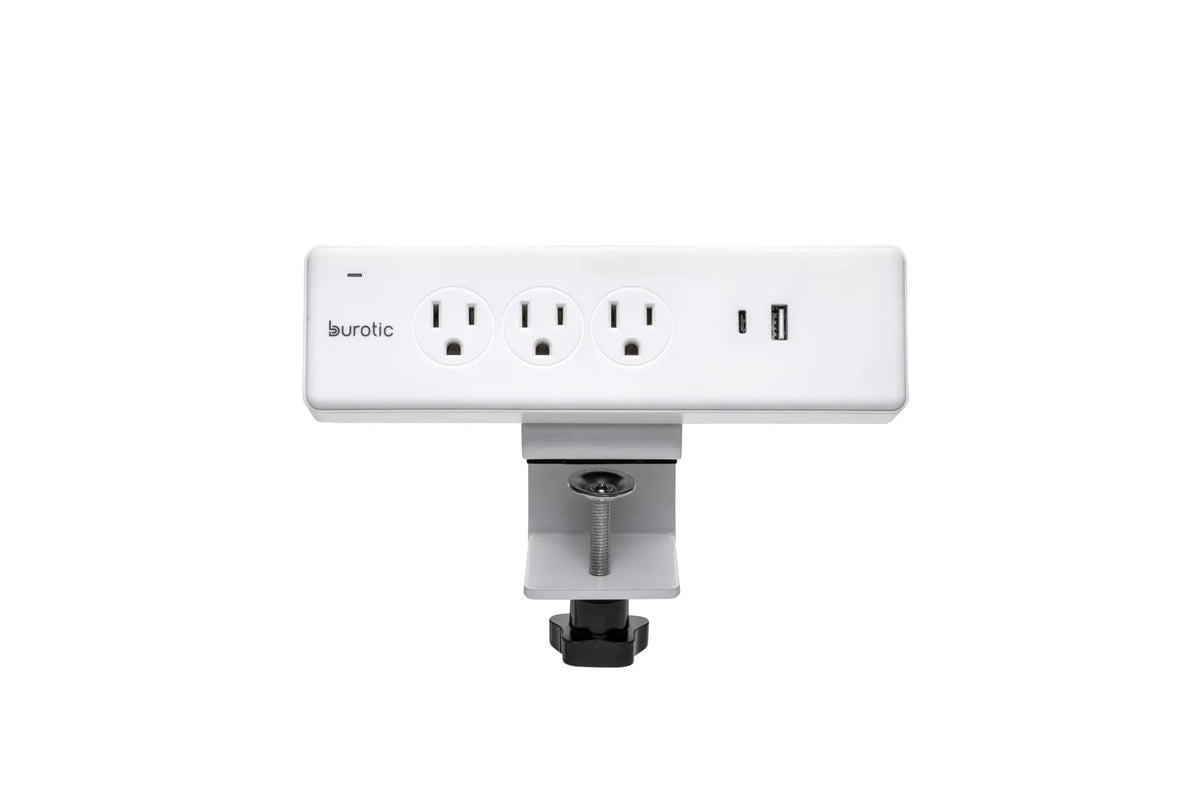
A clamp can keep receptacles accessible and reduce loose equipment on the floor, but mounting does not change the electrical rules. The selected photo clearly shows a white clamp-on unit with three grounded receptacles, one USB-A port and one USB-C port. It does not show the plug, cord rating, certification label or internal protection, so those details must be verified on the exact product.
The active Burotic Power Bar is an office accessory to compare. Review its current specifications, instructions and compatibility on the product page before installation. Do not infer its electrical features solely from this image.
When to stop using the setup
Disconnect the power bar by gripping the plug, not pulling the cord, if you notice heat, a burning smell, buzzing, sparking, repeated breaker trips, damaged insulation or an outlet that no longer holds the plug securely. Do not repeatedly reset a breaker without identifying the cause.
Electrical work is not a do-it-yourself troubleshooting task when the receptacle, wiring or grounding is uncertain. Use a licensed electrical contractor and follow local requirements.
Does a GFCI replace grounding?
A ground-fault circuit interrupter, commonly called a GFCI, is a protective device that monitors current imbalance and can disconnect power quickly. It serves a different function from equipment grounding. Do not assume that a receptacle is grounded simply because it has GFCI protection or a test and reset button.
Older installations can involve code-approved solutions that require specific labelling and wiring methods, but those decisions belong to qualified professionals working under the applicable electrical code. For a home office user, the safe rule is simple: do not alter the receptacle, plug or power bar. Have the installation assessed when compatibility is unclear.
Plan the desk layout around the cord
Before clamping a power bar to the desktop, choose a position the factory cord can reach without tension. Leave enough slack for a height-adjustable desk to travel through its full range. Raise and lower the empty desk while watching the cord path, then secure cables with a method intended for moving furniture.
Keep connectors away from pinch points, sharp frame edges and moving legs. The power bar should remain accessible for inspection and disconnection. Do not hide it under a pile of paper or inside a closed space that conflicts with its instructions. Recheck the cord after changing desk height, moving the desk or adding equipment.
Label power cords when several similar adapters share the same area. This makes it easier to disconnect the intended device without pulling on the wrong cable. Keep the power bar's own switch visible if the model includes one, and make sure furniture cannot press it accidentally. Good identification does not change electrical capacity, but it supports safer inspection and maintenance.
Bottom line
A three-prong office power bar belongs in a properly grounded three-slot outlet. Never remove the ground pin or use an adapter to bypass it. Grounding is only one part of a safe setup: verify ratings, certification, cord condition, connected loads and the suitability of the receptacle.

Previous article
Should You Shift Your Weight While Standing at a Desk?
Next article
Should You Shift Your Weight While Standing at a Desk?