



Should Your Office Chair Fit Under Your Desk?

In this article
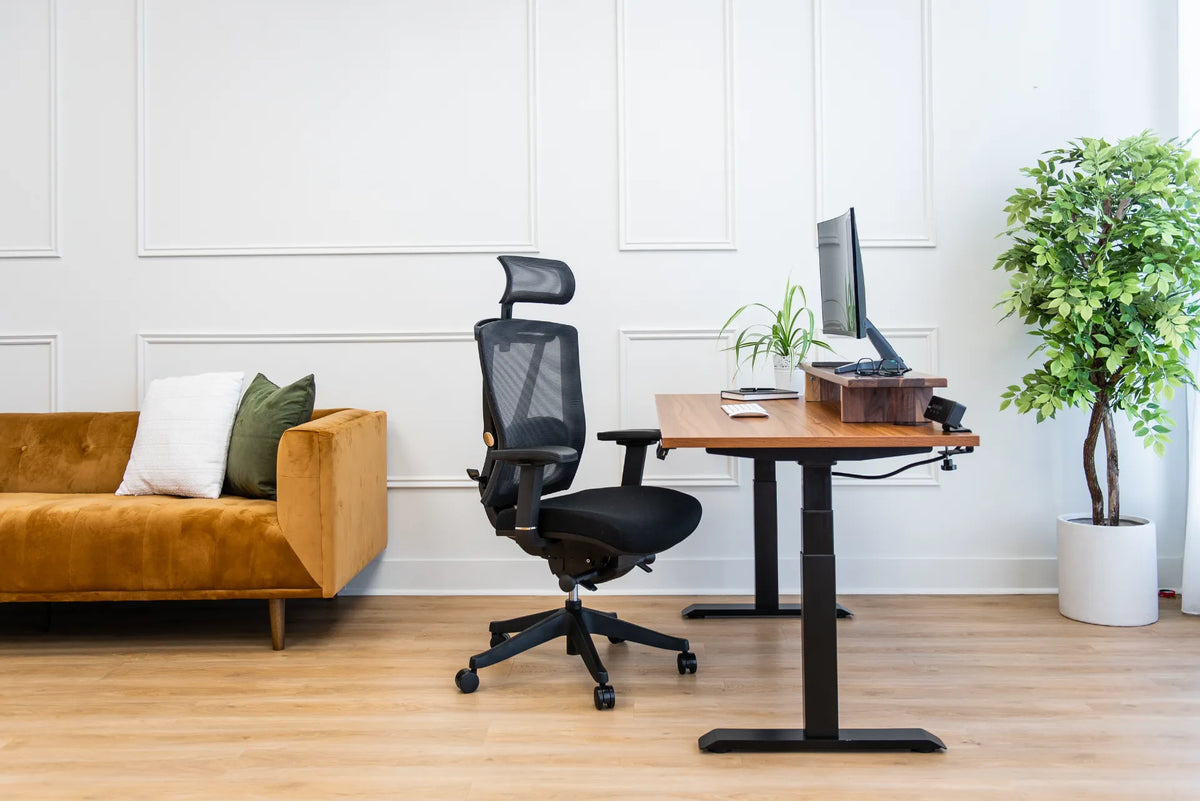
Your office chair does not need to disappear completely under the desk, but it should let you move close enough to work without reaching forward. In most setups, the key question is whether the armrests, seat and chair frame clear the desk well enough for your torso to approach the keyboard. Full tuck-in storage is convenient, but comfortable working clearance matters more.
A chair that cannot get close because the armrests hit the desktop can encourage rounded shoulders, extended arms and a forward head position. A chair that fits neatly under the surface can still be a poor ergonomic match if the desk is too high, the seat is too low or a drawer blocks the knees. This guide separates working fit from storage fit and shows what to measure.
Working fit and storage fit are different
Working fit means the chair can be positioned so you reach the keyboard and mouse with the upper arms near the torso, shoulders relaxed and back supported. The seat may remain partly outside the desk. This is normal.
Storage fit means the chair can roll farther under the desk when nobody is using it. It can save floor space and create a cleaner appearance, but it is not the primary ergonomic goal. A headrest or tall backrest rarely goes under a standard desktop, and it does not need to.
For a small room, both kinds of fit may matter. Measure for comfortable work first, then check how far the chair can tuck in without forcing the armrests down to an unusable height.
Why armrests are usually the limiting factor
The Canadian Centre for Occupational Health and Safety notes that armrests can prevent a user from getting close enough to the desk. Fixed armrests are especially likely to collide with the front edge. Adjustable armrests provide more options, but lowering them only for storage does not mean that low position will support the arms correctly during work.
Set the chair for your body before judging clearance. Adjust seat height so the feet are supported and the thighs are comfortable. Set the armrests so the shoulders can relax and the forearms receive light support without being pushed upward. Then roll toward the desk. If the armrests hit before the keyboard is within easy reach, the chair and desk need another adjustment.
Burotic's guide to office chair armrest height explains the body-based setup, while the guide to chair distance from the desk focuses on the final working position.
What should fit under the desk during work?
Your knees and lower legs need clear space. The chair base and casters should roll without hitting boxes, cable bundles or pedestal storage. The seat front should approach the desk without pressing the desktop into your abdomen. The armrests may pass under the desk, stop just in front of it or sit level with the edge, depending on their design and the task.
There is no requirement that the entire seat fit underneath while you type. In fact, pushing too far in can cause the desk edge to press into the body or bring the monitor too close. The correct position balances input-device reach, screen distance, back support and legroom.
Measure the desk before buying a chair
1. Measure clear height, not only desktop height
Measure from the floor to the lowest obstruction under the front work area. The underside of the desktop is only one reference. A support rail, drawer, apron, cable tray or control box may sit lower and become the real limit.
2. Measure clear width
Check the space between the desk legs, drawer unit or frame components where the chair will roll. Compare it with the chair's widest relevant point, which may be the armrests, seat or caster base. Leave practical room to move rather than aiming for a millimetre-perfect fit.
3. Measure clear depth
Look for a crossbar, storage unit or wall that limits how far the chair and knees can travel. A desk can be wide and tall enough yet still block the chair base after a few centimetres.
4. Include the floor surface
Thick carpet, a rug edge or a protective mat can change how easily the chair rolls and slightly change effective heights. Measure in the room where the workstation will actually be used.
Measure the chair in its working position
Product dimensions are helpful, but adjustable chairs do not have one fixed profile. Measure after setting the seat and armrests for the intended user.
- Armrest height from the floor: measure the highest front portion that may contact the desk.
- Overall armrest width: confirm it fits between desk supports if the chair will roll inward.
- Seat height and front edge: check where the seat meets the desk and where the thighs will sit.
- Base diameter: make sure the casters clear frame feet, storage and cables.
- Backrest and headrest: relevant mainly for storage depth, not normal working clearance.
When reviewing the Burotic Loop Ergonomic Chair or Peak Ergonomic Chair, use the current product-page measurements and adjustment descriptions. Do not assume that one setting suits every person or desk.
How to test the fit at an existing workstation
- Adjust the chair to support the feet, thighs, back and relaxed shoulders.
- Place the keyboard and mouse near the front working area.
- Roll forward until the controls are easy to reach.
- Check whether the armrests hit the desk or force the shoulders upward.
- Confirm that knees, thighs and feet have free space.
- Check that the monitor remains at a comfortable distance.
- Move from typing to standing up and sitting down without striking the desk frame.
- After work, test optional storage without changing the ergonomic settings.
If you must lower the armrests every time you approach the desk, the setup is workable but inconvenient. If lowering them removes useful support during work, look for a desk-height, chair or accessory change instead of accepting the mismatch.
Adjustable desks make compatibility easier
A height-adjustable desk can be set to the seated user's elbow and chair position, which can improve the relationship between armrests and desktop. Begin with the chair, because the feet and seat support establish the seated base. Then bring the desk surface to a height that lets the forearms approach the keyboard with relaxed shoulders.
The number on a desk controller is not the only reference. Desktop thickness, keyboard height, shoes and flooring all affect the relationship. The guide to desk height relative to chair height provides a step-by-step method.
Before raising or lowering an adjustable desk, make sure the chair, armrests and stored objects will not collide with the moving surface. Do not use desk motion to force an armrest under the edge.
Fixed desks and common obstacles
With a fixed-height desk, you may need to adjust the chair upward for keyboard height and add a footrest if the feet no longer rest comfortably. This is a general ergonomic option, not a prescription for every user. Avoid raising the chair so far that thigh clearance disappears.
Under-desk drawers are frequent obstacles. A centre drawer can reduce both height and knee space. Moving storage to one side may help, but frequently used input devices still need to remain centred with the body. Cable trays should keep wires controlled without occupying the knee zone.
Common fit problems and practical responses
The armrests hit the front edge
Confirm that their height is correct for your shoulders. If they are adjustable in width, depth or angle, use only settings supported by the chair. Consider whether the desk can move slightly higher without making the keyboard too high.
The chair fits, but you still reach forward
Move the keyboard and mouse closer. A deep desk does not require the controls to sit far from the edge. Check whether documents or a large mat are pushing them away.
The knees hit a drawer or rail
Reposition removable storage if the product allows it. If the obstruction is structural, compare the actual clear height and depth with another desk design.
The caster base hits desk feet
Increase the clear width or change the chair's approach angle only if the keyboard and monitor can remain aligned. Do not work twisted merely to park the chair.
The chair will not tuck away after work
Decide whether full storage is truly necessary. A partly exposed chair can be the correct result. In a very small room, compare compact chairs and desk frames using verified dimensions before purchasing.
A buying checklist
- Measure the lowest under-desk obstruction.
- Measure clear width and depth between frame parts.
- Set the intended user's chair height and armrests first.
- Compare the chair base and armrest dimensions with the clear opening.
- Allow room for knees, feet, cables and movement.
- Prioritize an easy working reach over a perfectly hidden chair.
- Verify current product measurements rather than relying on category labels.
When to request an ergonomic assessment
This information is general and does not diagnose or treat a medical condition. If a workstation adjustment causes persistent pain, numbness or weakness, consult an appropriate health professional. A qualified ergonomist can assess the interaction among the person, tasks, chair and desk.
The practical answer
Your chair should fit close to the desk, but it does not need to fit completely underneath. Set the chair for your body, then confirm that the armrests and frame allow easy access to the keyboard while preserving legroom. Treat full tuck-in storage as a secondary convenience. The best fit is the one that supports neutral, relaxed work and safe movement.
Previous article
How Close Should You Stand to a Standing Desk?