





Can You Put a Custom Desktop on a Standing Desk Frame?
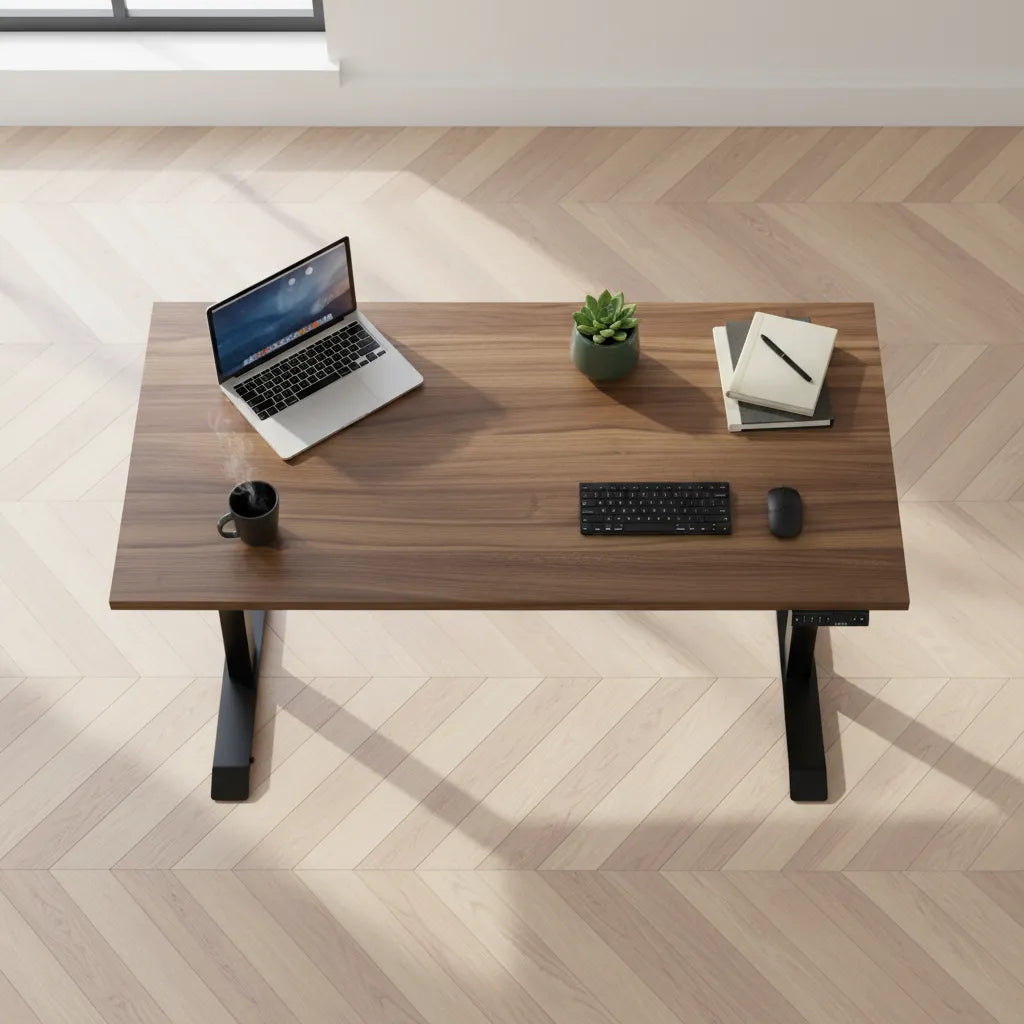
Yes, many standing desk frames can support a custom desktop when its dimensions, thickness, weight and mounting plan match the frame. Use this checklist before drilling.

In this article
Yes, you can put a custom desktop on many standing desk frames, provided the top fits the frame's supported dimensions, is thick enough for the mounting hardware, stays within the lifting capacity and can be attached safely. The key word is compatible. A beautiful slab is not automatically a suitable moving work surface.
Before buying or drilling, check the frame manual and current product specifications. Then map every fastener, cable accessory and control location on the underside of the top. Careful planning protects the surface and helps the completed desk lift evenly.
First confirm that the frame accepts a separate desktop
Some standing desks are sold as complete systems, while others are designed as frame-only products. A frame-only model is the clearest starting point because its documentation should identify supported top dimensions and mounting requirements.
The current Burotic Aspire Adjustable Standing Desk Frame page states that the frame is compatible with most tabletops from 22 to 36 inches deep and 42 to 75 inches long, with a minimum thickness of 0.9 inch unless custom screws are used. Confirm these live specifications again when ordering because product details can change.
Seven compatibility checks before installation
1. Desktop length
The top must fall within the frame's supported length range. A top that is too short may not cover or accept the mounting rails. One that is too long creates more overhang and leverage at the edges. Excessive overhang can also increase visible movement when the desk is raised.
2. Desktop depth
Depth must accommodate the frame feet, brackets and user equipment. It also affects monitor distance and work zones. Compare your planned top with Burotic's guide to choosing standing desk depth, then verify the frame-specific range.
3. Material thickness
The top needs enough material for screws to hold without breaking through the upper surface. Thin tops may require shorter hardware or reinforcement. Never assume the supplied screw is safe for a different top. Measure the top, subtract a safety margin and follow the frame manufacturer's instructions.
4. Total moving weight
Add the desktop, monitors, arms, computer, accessories and anything stored on or attached below the desk. The total must remain within the frame's stated lifting capacity, with a practical margin for future equipment. Weight should also be distributed rather than concentrated at one distant corner.
5. Structural integrity
Solid wood, plywood, bamboo and engineered materials behave differently. Check for cracks, voids, weak edges, severe warping or previous holes near proposed fasteners. A live-edge slab can work only if the mounting zone underneath is sufficiently flat and sound. Seek a woodworker's advice when the material is unusual or valuable.
6. Mounting pattern
Place the frame upside down on the underside of the desktop and centre it according to the instructions. Mark holes only after checking front and rear orientation, control reach, leg clearance and overhang. Avoid improvising holes in metal frame parts.
7. Accessories and cables
Reserve space for the controller, power bar, cable tray, monitor-arm clamp and any drawer. Check every item in both the seated and standing positions. Cables need enough slack to travel through the full height range without pulling.
How to choose a desktop material
Solid wood
Solid wood offers distinctive grain and can be refinished, but natural movement, weight and local weak points must be considered. Wide or thick slabs can add substantial load before any equipment is installed.
Plywood or laminated panels
Quality plywood can provide good dimensional stability. Laminate surfaces can be practical and easy to maintain, but the core and edge construction matter for screw holding. Confirm that planned fasteners enter sound material rather than a hollow section.
Reused desktops
An existing top can reduce waste and preserve a familiar work surface. Inspect old holes, damage and flatness. Remove or account for brackets from the previous base. A top that was stable on four fixed legs may reveal flex when supported by a narrower adjustable frame.
Installation sequence
- Protect the finished face and lay the desktop upside down on a clean, padded surface.
- Assemble the frame according to its manual without tightening improvised hardware.
- Position and centre the frame, checking the intended front edge.
- Mark the approved mounting holes and verify every mark twice.
- Pre-drill only when the instructions and material call for it, using a depth stop to protect the top.
- Install the correct screws without overtightening.
- Mount the controller and cable accessories where they remain reachable and clear of moving parts.
- With help, turn the desk upright. Large tops and powered frames can be heavy and awkward.
- Run the desk through its full travel with no obstacles, listening and watching for strain, uneven movement or cable tension.
If the frame documentation is missing, stop and obtain it before drilling. Do not guess the fastener length, pilot-hole size or bracket orientation.
How much overhang should a custom top have?
Overhang is the distance from the frame support to the top edge. It should be reasonably balanced from left to right and provide space for seating without weakening stability. The exact amount depends on the frame and top. The guide to standing desk top overhang explains how to evaluate it without treating one measurement as universal.
Common mistakes to avoid
- Choosing the top before checking the frame's supported range.
- Using screws that are too long for the material.
- Ignoring the desktop's contribution to total lift weight.
- Placing a monitor-arm clamp over a weak edge or directly above frame hardware.
- Mounting the controller where an armrest or drawer blocks it.
- Routing cables tightly at sitting height without testing standing height.
- Drilling through a finished surface because no depth stop was used.
When a complete desk is the better choice
A frame-and-top project is valuable when you need a particular material, size or existing surface. A complete desk is simpler when you prefer components already matched by the seller. Burotic offers both the frame-only path and complete adjustable desk configurations. The standing desk frame buying guide can help clarify which route suits the project.
For a custom solid wood surface supplied as part of a Burotic project, review the current Aspire Custom Solid Wood Standing Desk page and its available request process rather than assuming every dimension can be produced.
Frequently asked questions
Can I reuse a dining table top?
Possibly, but only after checking flatness, material, thickness, weight and the underside. Some dining tops contain aprons, hidden fasteners or hollow sections that interfere with a standing desk frame. Confirm that the mounting area is sound and that the final dimensions fall within the frame's limits.
Does a heavier top make the desk more stable?
Not automatically. More mass can change how movement feels, but it also consumes lifting capacity and increases stress during handling. Stability depends on frame design, height, foot placement, fastener security, top stiffness and load distribution. Stay within specifications instead of adding weight as a remedy.
Can I change the top later?
Usually, if the replacement is compatible and the frame is not damaged. Use new holes where required rather than relying on stripped fasteners, and inspect all connections before raising the desk. Recheck controller and cable placement because the new underside may differ.
Bottom line
A custom desktop can work very well on a standing desk frame when size, thickness, material, weight and mounting geometry all match. Verify the live frame specifications, plan the underside before drilling and test the completed desk through its full travel. If any structural or electrical detail is uncertain, pause and consult the frame manufacturer or a qualified installer.

Previous article
Should Your Second Monitor Be on the Left or Right?
Next article
Should Your Second Monitor Be on the Left or Right?