





How Many Devices Can You Safely Plug Into a Home Office Power Bar?

In this article
A power bar may have three, six or more outlets, but the number of open sockets does not tell you how many devices it can safely support. The safe answer depends on the bar's electrical rating, the power required by everything connected to it and the circuit that supplies the wall outlet. For most home offices, several low-power electronics can share one properly rated power bar. A portable heater, kettle or other high-wattage appliance usually should not.
This guide explains a practical way to evaluate a home office setup in Canada. It is general safety information, not a substitute for the product instructions, an electrician's assessment or local electrical requirements.
Start with the rating, not the outlet count
Look for a label on the power bar that states its maximum voltage, current and, sometimes, wattage. Common Canadian household circuits operate at 120 volts, but you should use the values printed on the product rather than assuming. Health Canada advises buyers to check that electrical products carry a recognized Canadian certification mark, such as CSA, cUL or cETL, and to confirm that the cord or bar is rated for the equipment being connected.
A simple estimate is watts equals volts multiplied by amps. A bar labelled 15 A at 120 V has a theoretical rating of 1,800 W. That number is not a target. The wall circuit may also supply lights, outlets or equipment elsewhere, and some devices draw more power when starting. Follow the power bar manufacturer’s instructions and leave practical headroom.
Count watts, not plugs
Find the input wattage on each device or its power adapter. If only voltage and current are shown, multiply them for a conservative estimate. Add the values for every device that could operate at the same time. A laptop adapter, monitor, phone charger and desk controller normally create a very different load from a space heater, microwave or kettle.
Do not use the USB port count as a shortcut. USB devices still contribute to the power bar's total load, even though their individual demand is often modest. The bar's label or manual should state the USB output and total rating.
A practical home office load check
- Read the power bar label. Confirm its maximum electrical rating and look for a recognized Canadian certification mark on the product itself.
- List every connected device. Include monitors, computer, dock, speakers, chargers, lamp and the adjustable desk if it shares the bar.
- Record input ratings. Use the label on each device or adapter, not an online estimate for a different model.
- Add simultaneous demand. Total the equipment that may run at the same time.
- Check the wall circuit. Remember that other receptacles may be on the same circuit. Frequent breaker trips are a warning, not an invitation to reset repeatedly.
- Separate high-wattage appliances. Health Canada specifically says never to plug a portable electric heater into a power bar or extension cord.
If the ratings are missing, damaged or confusing, stop using the product and ask the manufacturer or a licensed electrician. Guessing is not a safe calculation.
Devices that commonly share a home office power bar
Computers, monitors, docks and small chargers are often described as low-wattage office electronics. They may be suitable together when their combined demand stays within the bar and circuit ratings. That does not make every combination automatically safe. A high-performance desktop computer, laser printer or large uninterruptible power supply can change the calculation considerably.
Check printers and motorized equipment separately
Some printers have brief power peaks. An adjustable desk uses motors for short periods. Review each product manual for connection requirements. If a desk manufacturer directs you to use a wall outlet, follow that instruction. Burotic's existing guide, Can You Plug a Standing Desk Into a Power Bar?, covers that decision in more detail.
Keep heaters and kitchen appliances off the office bar
Portable heaters draw substantial power and can create a fire hazard when used incorrectly. Kettles, coffee makers, microwaves and similar heating appliances also impose heavy loads. Give them an appropriate permanent receptacle and follow their instructions. Do not treat an unused socket on the office power bar as proof that capacity remains.
Never daisy-chain power bars
Connecting one power bar to another does not create more electrical capacity. It adds connection points, encourages overloading and makes the actual load harder to see. The Electrical Safety Authority advises against overloading cords or circuits and against stringing extension cords together. Use a single certified bar connected directly to a suitable wall receptacle unless the manufacturer and applicable requirements explicitly provide otherwise.
If your office permanently needs more receptacles, the better solution may be additional fixed outlets installed by a licensed electrical contractor. A power bar is an accessory, not a replacement for adequate permanent wiring.
Placement matters on a sit-stand desk
A safe electrical load can still become a mechanical problem if cables pull when the desk rises. Place the bar where plugs remain accessible, cords retain enough slack through the full travel range and nothing can be pinched by the frame. Keep cords away from heat, water, sharp edges and walking paths. Health Canada also advises against routing extension cords under rugs or using them as permanent wiring.
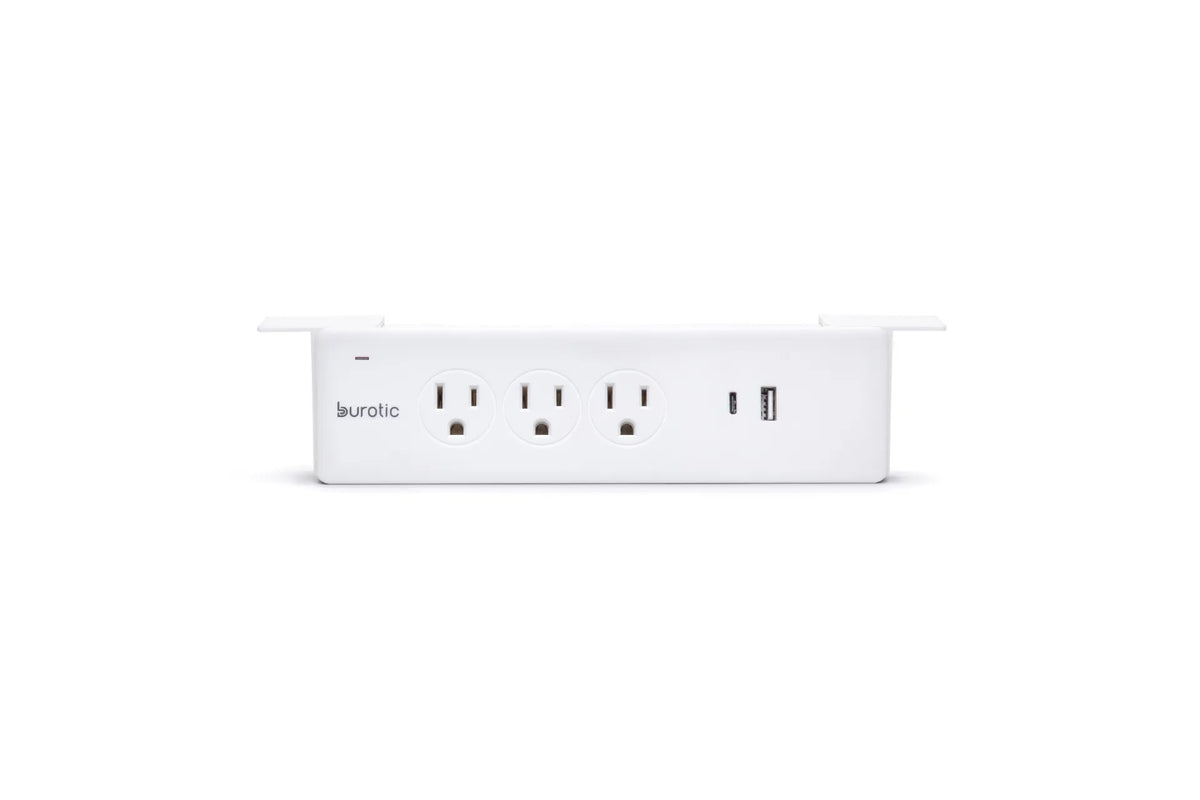
For a moving workstation, test the cable path at the lowest and highest positions while watching every connection. The guide Standing Desk Cable Management: A Safe, Movement-Ready Setup Guide provides a step-by-step layout. Burotic's Power Bar can be considered when a desk-mounted connection point suits the verified load and installation plan.
Warning signs that require action
- A plug, cord or power bar feels unusually warm or hot.
- You notice a burning smell, buzzing, discolouration or melted plastic.
- The bar's breaker or the home's circuit breaker trips repeatedly.
- A plug fits loosely or sparks at the receptacle.
- The cord is frayed, crushed, cut or damaged.
- The certification mark or rating label is missing.
Disconnect power safely and stop using damaged or overheating equipment. Do not tape over damage or increase the breaker size. Contact the manufacturer, property manager or a licensed electrician as appropriate.
The bottom line
There is no universal safe number of devices for every power bar. Three demanding devices can be too many, while several modest electronics may remain within a properly rated setup. Read the labels, total the simultaneous load, keep high-wattage appliances separate and never daisy-chain bars. If the calculation or circuit is uncertain, get qualified advice before reconnecting the equipment.
For related decisions, compare a power bar, surge protector and extension cord, then choose a mounting position only after the electrical and cable-movement checks are complete.
Frequently asked questions
Is it safe to fill every outlet?
It can be, but only when the combined load remains within the power bar and circuit ratings and every connection is in good condition. Empty or occupied sockets do not measure electrical demand. Three small chargers may draw less power than one heating appliance.
Does a surge protector prevent overloads?
Surge protection and overload protection address different hazards. A surge-protection label does not remove the need to calculate the load, follow the rated capacity and avoid daisy chaining. Review the exact protections described by the manufacturer rather than relying on the product category alone.
Can a larger power bar solve a shortage of outlets?
A bar with more sockets improves convenience, not the capacity of the branch circuit. If the permanent workspace regularly needs more power than one suitable outlet arrangement can provide, ask a licensed electrician to assess the circuit and install an appropriate permanent solution.


Previous article
How Deep Should a Desk Be for Writing by Hand?
Next article
Can You Use a Balance Stool at a Fixed-Height Desk?