

Should Your Elbows Be at 90 Degrees at a Standing Desk?

In this article
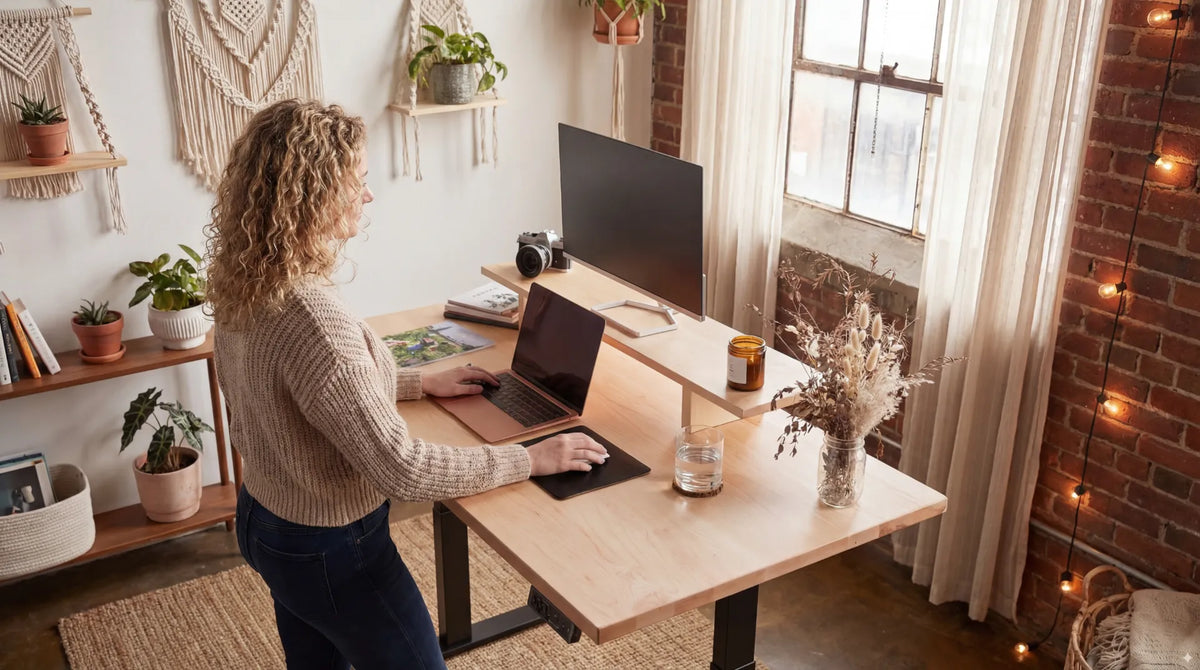
Should your elbows be at 90 degrees at a standing desk? Approximately, yes, but 90 degrees is a starting point rather than a number you must hold perfectly. The more useful goal is a neutral working position: shoulders relaxed, upper arms close to the torso, elbows comfortably bent and wrists in line with the forearms while the keyboard and mouse remain easy to reach.
If the work surface is too high, the shoulders rise and the wrists may bend upward. If it is too low, you may lean forward or reach down. A small change in desk height can matter more than trying to force the elbows into an exact geometric angle.
What a 90-degree elbow angle really means
A right angle describes the relationship between the upper arm and forearm. In a practical standing posture, the upper arms should hang naturally near the sides and the forearms should extend toward the keyboard without lifting the shoulders. Some people are comfortable very close to 90 degrees; others prefer a slightly more open angle. The key is that the input devices meet the hands without causing the wrists, shoulders or torso to compensate.
The CCHST advises setting a sit-stand work surface approximately at standing elbow position. Its keyboard guidance also recommends keeping the elbows close to the body at about 90 degrees, while allowing a somewhat more open angle. These ranges reflect real bodies and tasks. They are not a demand to remain motionless.
How to set your standing desk by elbow height
1. Start with your feet and torso
Stand in the footwear you normally use. Place your feet comfortably rather than locking them into one exact position. Let the knees remain relaxed and bring the head over the torso without pushing the chest forward. Do not set the desk while leaning on it, because that changes the apparent height.
2. Relax your shoulders
Let both arms hang by your sides, then bend the elbows until the forearms are roughly parallel with the floor or slightly lower toward the hands. Keep the shoulders down. If you have to shrug to reach the work surface, the desk is too high.
3. Bring the desk to the hands
Raise or lower the desk until the keyboard can sit just below elbow height. The hands should reach the home row without bending sharply up or down. The mouse should be on the same level and immediately beside the keyboard. This sequence is more reliable than choosing a height from a generic chart because it uses your body, footwear and actual equipment.
Use our standing desk height guide as an initial reference, then fine-tune the setting with your shoulders and wrists. Save the final position to a memory preset if your desk controller supports it.
4. Test the keyboard and mouse
Type for several minutes and use the mouse for normal work. Watch for shoulder elevation, outward-reaching elbows, pressure at the wrists or a tendency to lean on one hand. A standing height that looks correct in a photo can still be wrong during actual input. The keyboard and mouse, not the tabletop alone, determine the working height.
Signs the standing desk is too high
- Your shoulders rise while typing or mousing.
- Your elbows move away from the body to clear the desk.
- Your wrists bend upward or rest on a hard front edge.
- You feel pressure under the forearms.
- You step back from the desk and reach forward to work.
Lower the surface in small increments and retest. Thick desk pads, tall mechanical keyboards and keyboard feet can all raise the hands relative to the elbows. A lower desk setting or a flatter keyboard position may restore a neutral wrist line.
Signs the standing desk is too low
- You round the upper back or lean forward.
- Your forearms slope steeply down to the keyboard.
- You support body weight through the wrists or palms.
- Your neck moves forward as you approach the screen.
- You bend at the waist during keyboard or writing tasks.
Raise the work surface until the input devices come to you. If the desk height feels right for typing but not for handwriting, save separate positions. Handwriting often benefits from a slightly different surface height and a clear area where the forearm can move.
Do elbows need to stay exactly at 90 degrees?
No. An exact angle is less important than a relaxed, changeable posture. The Government of Canada's ergonomics guidance focuses on placing the keyboard and mouse just below elbow height and keeping the wrists neutral. CCHST guidance allows an approximate range rather than one fixed number. A slightly open elbow angle can feel natural, particularly when the keyboard sits close and the forearms slope gently downward.
Avoid deliberately holding the arms in place. Static posture can become uncomfortable even when it looks neutral. Change position, take short movement breaks and alternate sitting and standing. Ergonomics reduces unnecessary strain; it does not make one posture comfortable indefinitely.
Keyboard, mouse and wrist position
Keep the keyboard directly in front of the body, with the section you use most centred on you. Place the mouse close enough that the elbow stays near the torso. A wide keyboard can push the mouse outward, so a compact keyboard may help some users keep the shoulder relaxed. Retract keyboard feet if they cause the wrists to extend upward.
Our guide to keyboard and hand placement explains how the wrists, fingers and forearms should relate. The desk height is correct only if that neutral line is possible during real work.
Set the monitor after the desk
Do not raise the whole desk to fix a monitor that is too low. That improves the screen while making the keyboard too high. Set the surface for the arms first, then adjust the monitor independently with its stand, riser or arm. The screen should remain at a comfortable height and distance without requiring the chin to lift or the head to move forward.
Follow the sequence in How High Should Your Monitor Be at a Standing Desk?. An independently adjustable monitor is especially useful when changing between sitting and standing because the ideal relationship between eyes, screen and work surface may not stay identical.
What if the desk cannot reach the right height?
Check the actual adjustment range before choosing a frame or complete desk. A person who is shorter may need a lower minimum height; a taller person may need more maximum height, especially when working in shoes. The thickness of the tabletop and accessories placed on it also affect effective hand height.
A height-adjustable option such as the Aspire Wood Laminate Standing Desk can make it easier to set separate sitting and standing positions. Always compare the product's current dimensions and adjustment range with your measured elbow height rather than relying on stature alone.
A simple two-minute check
- Stand naturally with shoulders relaxed.
- Bend the elbows to about 90 degrees without lifting the shoulders.
- Place the keyboard and mouse just below elbow height.
- Type and use the mouse for at least two minutes.
- Adjust in small steps until the wrists stay straight and the upper arms remain close.
- Set the monitor only after the input height feels right.
Final answer
Your elbows should usually be close to 90 degrees at a standing desk, but the angle does not need to be exact. Use it as a starting landmark. The better test is whether your shoulders stay relaxed, elbows remain near your sides, wrists stay in line with the forearms and the keyboard and mouse can be used without reaching or leaning.
Set the desk around the hands, then adjust the monitor separately. Recheck the position after real typing and mousing, and keep moving throughout the day. If discomfort persists despite reasonable adjustments, seek guidance from a qualified ergonomics or health professional.
Previous article
How Close Should Your Office Chair Be to Your Desk?
Next article
How Close Should Your Office Chair Be to Your Desk?