





Can You Charge a Phone and Earbuds at the Same Time on a Wireless Desk Pad?
Some wireless desk pads can charge a compatible phone and earbud case at the same time. Confirm the pad's two-device design, device compatibility and correct charging zones first.

In this article
Yes, a wireless desk pad can charge a phone and an earbud case at the same time when the pad is designed with two charging positions, both devices support the charging standard and the power source meets the pad's requirements. A large surface does not automatically mean that every area contains a charging coil. Most products have specific zones, and each device must be centred over the correct one.
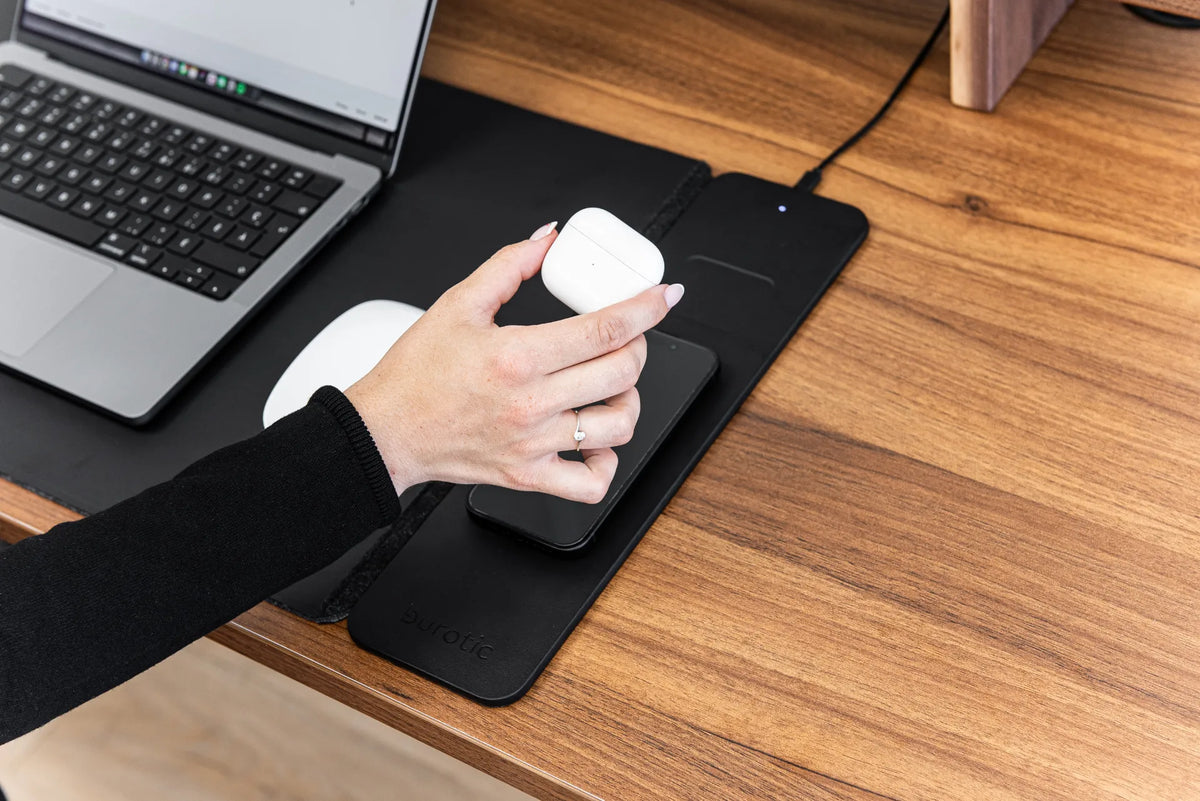
Burotic's Wireless Charging Desk Pad is described as a modular charging surface for a smartphone and earbuds, with simultaneous charging for two devices. Check the current product instructions, because compatibility and required power can vary by device and charger.
What simultaneous wireless charging requires
A pad designed for two devices
One coil normally transfers power to one receiver at a time. A desk pad that charges two devices needs separate charging positions or a module specifically engineered for multiple receivers. Look for two marked zones, a dedicated earbud position or an explicit two-device statement in the specifications.
Do not stack the earbud case on the phone or place two devices over one symbol. They can prevent proper alignment and trap heat.
Compatible receiver hardware
The phone and earbud case must each support the wireless standard used by the pad. The Wireless Power Consortium maintains the Qi standard and a product database for certified devices. Confirm the exact model, not just the brand family. Some earbuds support wireless charging only with a specific case, while another case for the same earbuds may require a cable.
Enough input power
A two-device pad can require more input power than a single compact charger. Use the adapter and cable specified by the pad manufacturer. A plug that physically fits may not provide the correct protocol or power. Avoid damaged cables, loose outlets and unverified adapters.
How to place the phone and earbuds
- Connect the pad according to its instructions.
- Remove keys, coins, payment cards and other metal objects from the charging area.
- Place the phone flat on the phone zone.
- Place the earbud case flat on its own zone, with the receiver side facing the pad.
- Wait several seconds and check each device for a charging indicator.
- If one does not start, move it in small increments while keeping it flat.
Charging coils need sufficient overlap. A device can be only a few centimetres off centre and still fail to charge. Camera bumps, thick cases and seams may keep a device from lying flat.
How to confirm both devices are actually charging
Check the phone's battery icon and the earbud case indicator separately. A light on the pad may only confirm that the module has power, not that both receivers are charging. Leave the devices undisturbed for several minutes, then verify that each battery level has increased.
Wireless charging speed varies with the device, battery level, temperature, adapter and background activity. Simultaneous charging may divide available power. The correct test is not whether both devices charge at identical speed, but whether each reports charging and gains energy under normal conditions.
Cases and accessories that interfere
A thin compatible case may work, but thick shells, metal plates, card wallets, grip rings and battery cases can block or weaken charging. Remove the case during troubleshooting. Do not place credit cards, access badges, passports or keys between a device and the pad.
An earbud case cover can create the same problem. Decorative shells may be thicker at the hinge or contain metal. Test the original charging case without the cover before concluding that the pad is faulty.
Heat: what is normal and when to stop
Some warmth can occur during wireless power transfer, especially when two devices charge together. Excessive or persistent heat is not something to ignore. Keep the pad flat, uncovered and away from direct sun or heating vents. Do not charge beneath papers, fabric or a closed laptop.
Disconnect the system if you notice swelling, melting, smoke, a damaged battery, exposed wires, unusual odour or persistent abnormal heat. Let equipment cool naturally and follow the device manufacturer's safety instructions. Do not open the charging module or attempt an internal repair.
Why one device charges and the other does not
The earbud case may not support wireless charging
Some earbud models are sold with different case versions. Confirm the case model and wireless capability.
The devices are on the wrong zones
A larger phone coil and smaller accessory coil may be positioned differently. Swap only if the instructions allow it.
The adapter is underpowered
The pad may have enough power to start one receiver but not two. Use the specified adapter and cable.
Alignment is marginal
Move each device separately in small steps. If charging stops after a notification, vibration may have shifted the phone.
Heat management has slowed charging
Phones and cases may reduce or pause charging when warm. Move the setup to a normal room temperature, remove covers and let the devices cool.
A controlled troubleshooting sequence
- Test the phone alone on its normal zone.
- Test the earbud case alone on its normal zone.
- Confirm both models support wireless charging.
- Remove cases and accessories.
- Reconnect the specified cable and adapter.
- Place both devices and confirm each indicator.
- Test a known-compatible device if the instructions permit.
If neither device charges, focus on the power source, cable and pad. If only one fails, focus on that device's compatibility, case and alignment. Burotic's guide to a wireless desk pad that is not charging provides a broader diagnostic checklist.
Keep the charging surface clean
Dust and grit do not usually stop energy transfer by themselves, but they can prevent a device from sitting flat and can scratch cases or the desk pad. Disconnect power before cleaning. Use the product's approved method and avoid saturating seams or electronic modules. See Burotic's guide to cleaning a wireless charging desk pad safely.
Build a charging routine that stays simple
Assign one position to the phone and one to the earbuds. Place the pad where both devices remain visible and away from the active mouse area. Route the charging cable so it cannot catch on a chair, drawer or moving standing-desk frame.
Simultaneous charging is most useful when it removes daily cable clutter. Confirm the hardware, use the correct power source and centre each device on its own zone. Those checks matter more than the overall size of the pad.
Frequently asked questions
Can any wireless earbud case charge on the pad?
No. The case itself must contain a compatible wireless receiver. Earbuds that charge inside a case are not automatically wireless-chargeable from the outside. Check the case model and manufacturer documentation.
Can a smartwatch use the earbud position?
Do not assume so. Many smartwatches use proprietary coil geometry or a dedicated magnetic charger. Use the watch manufacturer's approved charging method unless the desk pad explicitly lists that exact model or standard.
Will two devices always charge at the advertised maximum speed?
Not necessarily. Input power, temperature and power sharing can limit each output. Marketing wattage is not a promise that every device accepts that rate. Verify the receiving limits of the phone and case as well as the pad's combined-output specifications.
Should devices stay on the pad overnight?
Follow the device and pad manufacturers' guidance. Keep the surface uncovered, inspect cables regularly and avoid damaged batteries. If either device behaves unusually, disconnect it and seek qualified support.
Sources
- Wireless Power Consortium: Qi standard and certified product resources
- Device manufacturers' current wireless charging and battery safety instructions
- Burotic Wireless Charging Desk Pad product specifications

Previous article
Can You Put a Desk Behind a Sofa? Layout, Clearance and Cable Tips