





Should You Wear Shoes at a Standing Desk? Comfort and Safety Guide

In this article
For most people, supportive shoes are the safer default for longer periods at a standing desk, especially on hard flooring. Socks or bare feet may feel comfortable for a short home-office interval, but they provide less cushioning and can change stability, traction and effective working height. The right choice depends on the floor, the task, the time spent standing and individual comfort.
Footwear is only one part of the setup. Standing still for too long can be uncomfortable even in excellent shoes. A better strategy combines suitable footwear, a level surface, correct desk height, frequent position changes and sitting or walking breaks. This article provides general ergonomic information, not medical advice or a diagnosis.
Quick answer: use supportive footwear and keep changing position
The CCOHS sit-stand desk guidance explicitly recommends supportive footwear when the desk is raised. It also suggests a suitable anti-fatigue mat or footrest and encourages shifting weight. Those recommendations point to a system rather than a special type of office shoe.
Choose footwear that fits, gives the toes room, holds the heel securely and provides appropriate support and cushioning for the floor. Then stand only for a comfortable interval and change before fatigue alters posture. Shoes cannot make prolonged motionless standing a good routine.
Why footwear changes a standing desk setup
It changes your effective height
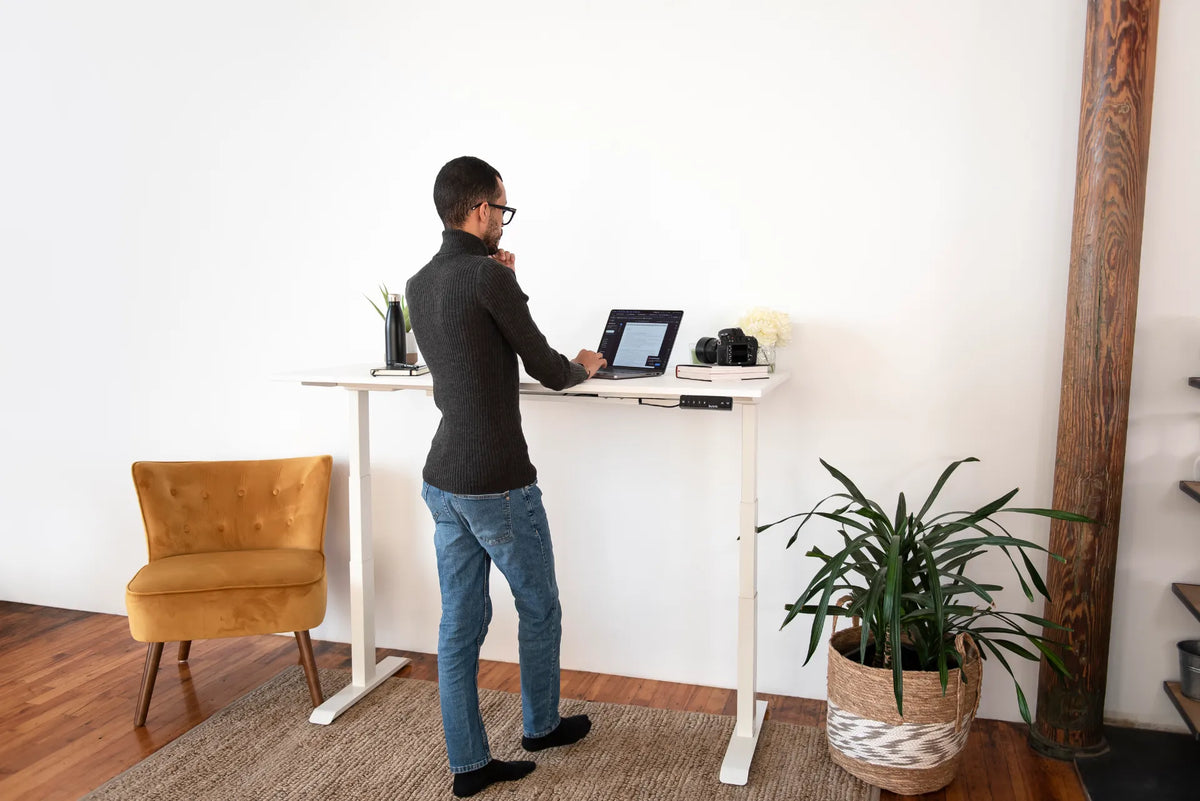
A shoe sole, insole or thick mat raises the body relative to the desktop. If you save a standing height while wearing shoes and later work in socks, the surface may feel too high. Recheck the height whenever footwear changes rather than forcing the shoulders or wrists to adapt.
It changes cushioning
Hard floors transmit more pressure than resilient surfaces. Cushioning can improve comfort, but extremely soft footwear or mats may feel unstable and can increase effort. The objective is a firm, predictable base that permits small movements.
It changes traction
Socks can slide on smooth wood, laminate or tile. Loose slippers can also shift or catch. Select a stable contact with the floor, particularly when you step away from the desk, use a footrest or move the chair.
Supportive shoes: the practical default
CCOHS guidance for standing work recommends shoes that allow the natural shape of the foot, keep the heel secure, leave room for the toes and provide arch support. It also advises choosing fit and comfort individually. These principles matter more than a specific style, brand or appearance.
A clean indoor shoe can be a practical home-office option. Try it on the actual floor and during normal desk tasks. The shoe should not make you rock forward, grip with the toes or feel unstable. A small height difference between pairs may require a separate saved desk position.
Working in socks or bare feet
Socks or bare feet are not automatically harmful in a private home office, but they remove some protection and support. On a cold, hard or slippery surface, comfort can decline quickly. A sock with poor grip may create a fall risk. Bare feet are also unsuitable where dropped objects, sharp items or workplace rules create hazards.
If you prefer socks, keep the floor dry and clear, use a stable non-slip surface and start with a short interval. Notice whether you begin curling the toes, leaning on the desk or shifting constantly to escape pressure. Those are reasons to change position, add appropriate support or put on footwear.
Match footwear to the floor
Concrete, tile and other hard surfaces usually make cushioning more important. Wood, cork, resilient flooring or a suitable mat can feel more forgiving, but the surface still needs to be level and non-slip. CCOHS advises against introducing thick, overly soft mats that can increase fatigue or tripping risk.
A rug changes the equation. It may add some resilience, but a deep pile can reduce the stability of the desk or chair. Check that edges lie flat and that shoes do not catch. Do not assume a decorative rug performs like a purpose-designed standing mat.
When an anti-fatigue mat helps
A mat can provide a more comfortable standing surface and encourage small movements. It does not replace supportive footwear, desk adjustment or breaks. Choose a mat that lies flat, has sloped or controlled edges and remains stable on the floor.
The active Burotic Anti-Fatigue Mat is one current option. Check the product page for its present specifications. The guide on how anti-fatigue mats work explains where they help and where they do not.
Reset desk height after changing shoes
- Put on the footwear you will actually use.
- Stand close to the desk with weight balanced and shoulders relaxed.
- Raise or lower the surface until the keyboard and mouse are near standing elbow height.
- Keep the wrists in line with the forearms and the elbows near the body.
- Adjust the monitor independently so the head remains balanced.
- Test typing and pointing for several minutes.
- Save the height only after the complete setup feels repeatable.
If you alternate between indoor shoes and socks, use separate memory positions where the controller permits it. Label the routine mentally by footwear, not just by a number. The saved setting is a starting point, and small daily adjustments are normal.
Move before discomfort becomes the timer
CCOHS states that recommendations for sitting and standing intervals vary, while the key is to alternate and allow time to adapt. Do not wait for sore feet to force the change. Use natural events such as the end of a call, a document section or a task block as reminders.
Standing, sitting and walking each load the body differently. A short walk changes more than simply switching from a chair to a fixed stance. The guide on how long to stand at a desk offers a gradual plan without treating one ratio as universal.
Use posture cues that do not demand rigidity
Keep the shoulders relaxed, the head balanced and the keyboard close. Avoid locking the knees or holding one position perfectly. Shift weight, use a stable footrest briefly and change stance. The goal is comfortable variation, not a frozen model pose.
If footwear causes you to lean forward, the sole shape or desk height may be part of the problem. If the desk causes pressure at the wrists, adjust the surface rather than compensating through the feet. Review the standing desk discomfort guide for a structured check.
Common footwear mistakes
Wearing outdoor shoes that carry grit
Debris can scratch flooring and reduce traction on a mat. Clean soles or use a dedicated indoor pair.
Choosing extreme softness
More cushioning is not always better. A very soft shoe and a very soft mat together can feel unstable. Test the combined system.
Using loose slippers
A backless or oversized slipper can slide during chair movement or when stepping off a mat. Secure fit matters.
Never changing the saved height
Different shoes change effective body height. Recheck the desk when footwear, mat or flooring changes.
Trying to stand through fatigue
Shoes may delay discomfort but do not remove the need to sit, walk and take breaks.
A simple two-week test
For several days, use one supportive indoor shoe and record the approximate standing intervals, floor surface and any discomfort. Then change only one variable, such as the mat or footwear. Keep the desk height coordinated with that change. A simple comparison is more useful than replacing several items at once.
Stop the test and seek qualified advice if you develop persistent pain, numbness, swelling, weakness, skin changes or symptoms that affect normal activity. People with an injury, diabetes, circulation concerns or prescribed footwear should follow their health professional's guidance.
Final recommendation
Supportive, well-fitting shoes are the most practical default for standing desk work. Socks or bare feet may suit brief periods in a controlled home environment, but only when the surface is stable, non-slip and comfortable. Whatever you wear, reset the desktop to your actual height.
Most importantly, do not ask footwear to solve prolonged standing. Alternate positions, move regularly and adjust the desk, monitor and input devices as one system. Comfort should come from the routine as much as from the shoe.
Sources: CCOHS, Sit/Stand Desk; CCOHS, Working in a Standing Position; CCOHS, Safety Footwear.


Previous article
How Far Apart Should Office Desks Be? A Practical Space Planning Guide
Next article
Should Your Desk Face a Wall or the Room? A Layout Guide