





Should an Anti-Fatigue Mat Be Firm or Soft?
An anti-fatigue mat should generally feel resilient rather than hard or deeply soft. It should compress slightly, support small weight shifts and remain stable underfoot without creating a trip hazard. Learn how to compare firmness for a standing desk.

In this article
An anti-fatigue mat should normally feel resilient, not rock hard and not deeply soft. It should compress a little under your weight, recover when you move and remain stable enough that your feet do not sink or wobble. A very soft mat is not automatically more comfortable, and a very firm mat may feel too similar to the hard floor underneath.
Firmness is only one part of the choice. Thickness, edge shape, surface grip, floor type, footwear and how long you stand all affect the result. Use this guide to compare mats without treating comfort claims as medical promises.
Quick comparison
| Mat feel | Possible advantage | Possible drawback |
|---|---|---|
| Very firm | Stable and easy to step across | May provide little difference from a hard floor |
| Resilient or medium-firm | Allows small movement while preserving support | Quality and recovery vary by material |
| Very soft | Feels cushioned at first contact | Feet may sink, balance may feel less stable and edges may become hazardous |
For many standing-desk users, a responsive medium-firm surface is the most practical starting point. Personal preference matters, so test the mat with the footwear and tasks you actually use.
Why more softness is not always better
CCOHS advises against thick foam-rubber mats because too much cushioning can contribute to fatigue and create a tripping hazard. The same guidance recommends level, non-slip floors and slanted mat edges where mats cover hard surfaces.
When a mat compresses deeply, the ankles and feet may work harder to maintain balance. A person who frequently steps away from the desk may also notice the height change more. The mat should encourage subtle weight shifts without feeling like an unstable exercise surface.
Look for recovery, not just compression
Press the mat with your foot, then move away. A useful resilient mat should recover its shape rather than keeping a deep depression. Slow or uneven recovery can change how the surface feels across the work zone. This simple observation does not replace the manufacturer's specifications, but it helps compare samples.
When a firmer mat may suit the task
A somewhat firmer mat can make sense when you move on and off the work zone often, wear supportive shoes or need a stable surface for precise standing tasks. It may also make chair movement easier when the mat is moved aside between standing sessions.
Firm does not mean rigid. If the mat has almost no give and the floor is already hard, the comfort difference may be limited. The systematic research on cushioning and prolonged standing reports mixed or limited evidence, so avoid assuming any one firmness prevents pain or injury.
How to test firmness at a standing desk
Test in your normal footwear
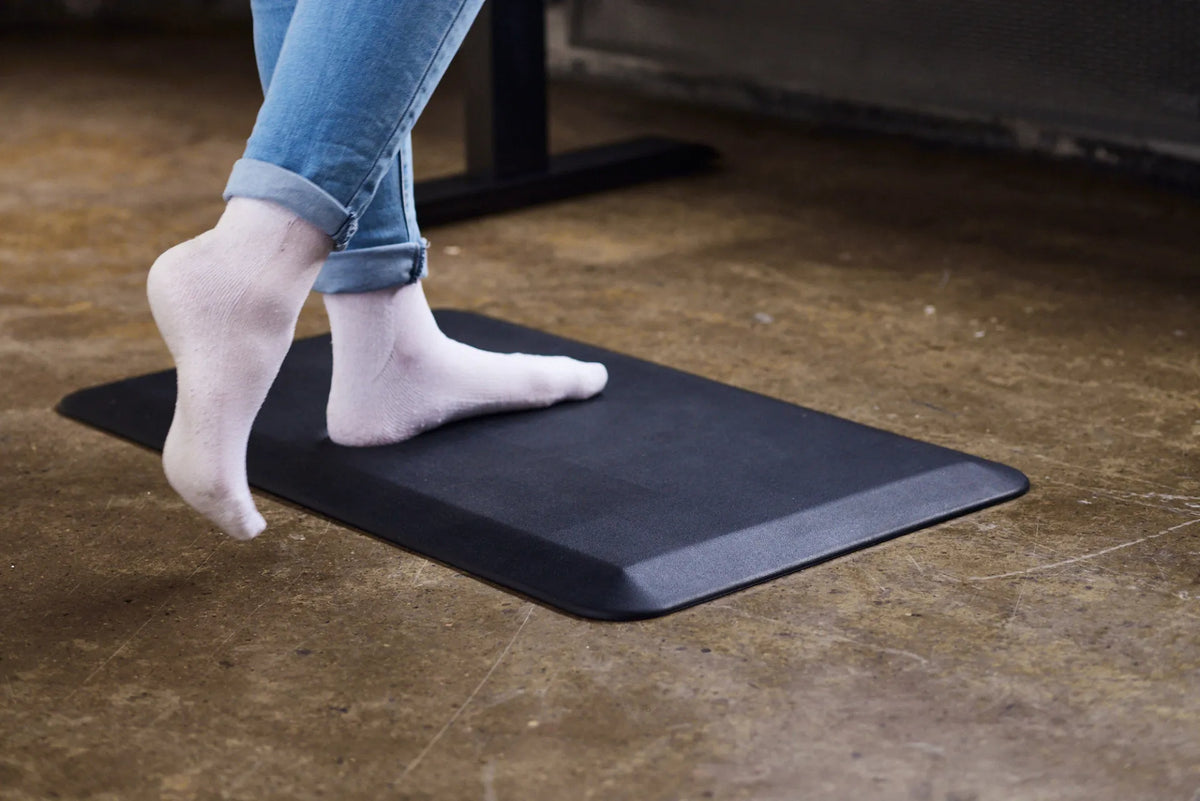
The selected photo shows socks, but a product test should match your real routine. Shoes, insoles and bare or socked feet distribute pressure differently. CCOHS recommends supportive footwear for standing work. A mat that feels balanced in shoes may feel much softer without them.
Use both standing and stepping tasks
Stand in your normal keyboard position, shift weight from side to side and step off the mat several times. Your feet should not feel trapped in depressions. The surface should remain flat and the edges should not curl or slide.
Check the full work zone
Test the centre and edges. Some mats vary in firmness or use contoured sections. Those features may prompt movement, but they should not interfere with a stable typing position. If you must constantly search for a flat spot, the design may not suit computer work.
Start with short sessions
No mat makes prolonged static standing a goal. CCOHS recommends alternating positions and moving rather than staying still. Begin with short standing periods and adjust the desk height, footwear and schedule along with the mat.
Firmness, thickness and edge design are different
A thick mat can be firm, and a thin mat can be soft. Thickness describes the distance from floor to top surface, while firmness describes resistance to compression. Compare both. Our guide to anti-fatigue mat thickness covers the height and transition issue.
Bevelled edges matter because they create a more gradual transition from the floor. The image selected for this article clearly shows a black mat with sloped edges. That visible design reduces the abruptness of the edge, but safe use still depends on the mat lying flat, staying in place and remaining clear of the chair and walkway.
Match the mat to the floor and workspace
On concrete or another hard surface, a resilient mat can create a noticeable change underfoot. On carpet, the same mat may behave differently or rock if the backing is not compatible. Follow the mat manufacturer's floor guidance and do not stack mats.
Place the mat where both feet can remain on it during normal standing work. It should not force one foot onto the hard floor or sit under moving desk legs. See where to place an anti-fatigue mat for the footprint and chair-clearance checks.
Signs that a mat may be too soft
- Your feet sink deeply and feel difficult to reposition.
- You feel unsteady while reaching for the mouse or a document.
- The edges compress, curl or shift when stepped on.
- The mat develops lasting depressions.
- Moving on and off it feels abrupt or awkward.
Signs that a mat may be too firm
- It feels almost the same as the hard floor below.
- There is little visible or felt compression under normal weight.
- You still avoid small weight shifts because the surface feels unforgiving.
- The material becomes rigid or slick under expected room conditions.
These signs are practical observations, not diagnostic tests. Persistent pain, swelling, numbness or balance problems should be discussed with an appropriate health professional.
What to verify before buying
- Published dimensions and thickness
- Edge profile and surface texture
- Backing compatibility with your floor
- Care instructions and expected room conditions
- Return terms if firmness cannot be tested locally
- Space needed to move the mat for seated work
Recheck the mat after the first week
A brief showroom test cannot reproduce a full work routine. During the first several days, note whether the mat stays flat, returns to shape and remains in the intended position. Check whether you can step on and off without catching an edge and whether the surface still feels stable near the end of a standing period. Also inspect the floor below for moisture, debris or marks according to the floor-care instructions. If the mat changes shape, develops a slippery surface or interferes with the chair, stop using it until the cause is understood. Comfort should not come at the expense of a clear, stable work area.
The active Burotic Anti-Fatigue Mat is one option to compare against your measured standing zone and floor. Review the current product details rather than inferring firmness from a photo. For the broader evidence and setup tradeoffs, read whether anti-fatigue mats work.
Bottom line
Choose a mat that feels resilient and stable rather than extremely soft. It should permit small movements, recover its shape and stay flat on the floor. Test it with your normal footwear, desk height and standing routine, then continue alternating posture and moving throughout the day.
Sources
- Canadian Centre for Occupational Health and Safety: Working in a Standing Position
- Canadian Centre for Occupational Health and Safety: Sit/Stand Desk
- Ergonomics: Systematic Review of Cushioning Materials and Prolonged Standing
- Journal of Occupational and Environmental Hygiene: Anti-Fatigue Mats and Perceived Discomfort
Previous article
Should Your Mouse Be Level With Your Keyboard?
Next article
Should Your Mouse Be Level With Your Keyboard?