





Do Anti-Fatigue Mats Work? How to Choose One for a Standing Desk

In this article
An anti-fatigue mat can make standing on a hard floor more comfortable, but it is not a cure for prolonged standing and it cannot correct a poorly adjusted workstation. The best reason to use one at a standing desk is practical: it adds a cushioned surface under your feet while you continue to alternate between sitting, standing, and moving.
This guide looks at what the evidence says, who may benefit, what to check before buying, and how to use a mat without creating a trip hazard. It offers general ergonomic information, not medical advice. If standing causes persistent pain, swelling, numbness, dizziness, or another concerning symptom, consult a qualified health professional.
What is an anti-fatigue mat?
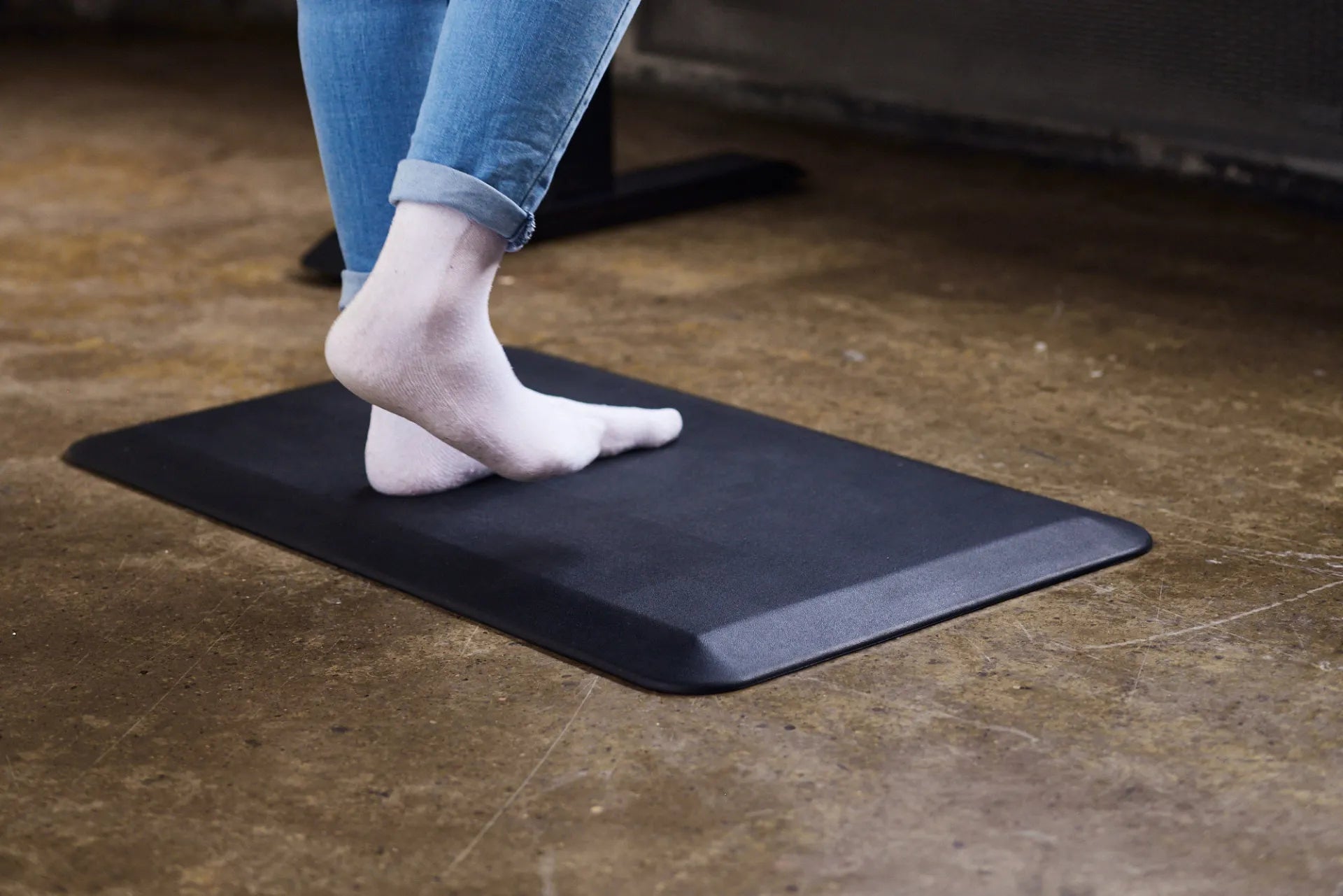
An anti-fatigue mat is a resilient floor surface designed for people who stand in one place for part of their work. Materials vary, but the mat normally provides more cushioning than concrete, tile, or another hard floor. The surface should be stable enough to stand on while allowing small changes in pressure and stance.
The Burotic Anti-Fatigue Mat is designed as a standing desk accessory. Its role is to complement a height-adjustable workstation, not to encourage someone to stand continuously for an entire day.
Do anti-fatigue mats actually work?
The short answer is that cushioned surfaces can reduce perceived discomfort or fatigue for some people during prolonged standing, but results vary by person, mat, footwear, task, and exposure time.
The Canadian Centre for Occupational Health and Safety, or CCOHS, explains that standing discomfort is influenced by several factors, including job design, footwear, flooring, and how long a person remains in one position. CCOHS recommends considering position changes and the overall workstation along with any mat.
A 2018 systematic review indexed by PubMed found a moderate level of evidence supporting cushioned materials for reducing discomfort and fatigue among standing workers. A NIOSH-supported study comparing four commercial mats with a hard floor found that three mats reduced discomfort after four hours, but it did not establish one universally superior design. The evidence supports a balanced conclusion: a mat can be useful, but no mat removes the need for movement, sensible work design, and a correctly adjusted desk.
Why standing still can become uncomfortable
Standing is a normal posture, but keeping the same position for long periods can load the feet, legs, and postural muscles. A hard floor offers little cushioning, and people may gradually lock their knees, lean on one hip, or shift into an awkward position as they tire.
NIOSH concluded from a review of prolonged-standing research that dynamic movement appears to be the most consistent approach for reducing discomfort and risk. Walking briefly, changing position, sitting, or leaning at appropriate moments are all useful options. An anti-fatigue mat is most helpful when it supports this variety rather than replacing it.
Who is most likely to benefit?
An anti-fatigue mat may be worth considering if:
- You use a standing desk on concrete, tile, hardwood, laminate, or another firm surface.
- Your feet or lower legs become tired during relatively short standing periods.
- You tend to stand in one defined work area.
- You want a clear physical zone for the standing position.
- Your footwear is comfortable and supportive, but the floor still feels unforgiving.
A mat may be less useful if it is constantly in the way of your chair, if your workspace is too small to place it safely, or if a mobility or balance concern makes a softer surface unsuitable. In those situations, discuss the setup with an ergonomics or health professional.
Seven checks before choosing a standing desk mat
1. Firmness and support
A mat should feel cushioned without making your feet unstable. Very soft foam can compress unevenly, make balance harder, or encourage the ankles to work excessively. A very firm mat may feel similar to the floor and provide little noticeable difference. The right balance is personal, so a trial period is valuable when available.
2. Surface grip
Check both sides. The top should support normal footwear without feeling slippery. The underside should stay in place on your floor type. Dust, moisture, floor polish, and worn surfaces can change grip, so inspect the area regularly rather than assuming the mat will never move.
3. Bevelled edges
Tapered edges can reduce the abrupt height change around the mat and make it easier to step on and off. They do not eliminate trip risk. The mat should remain flat, with no curled corners, tears, or lifted sections.
4. Size
The mat should be large enough for a comfortable stance and small weight shifts, but not so large that it blocks chair movement, doors, drawers, or the desk frame. Measure the usable floor area while the chair is in its normal sitting position and again when moved aside.
5. Thickness and desk height
Standing on a mat raises your body relative to the desk. Even a modest thickness may require you to increase the standing preset. Recheck keyboard, mouse, and monitor positions after adding the mat. Our standing desk height guide explains how to use elbow height as a practical starting point.
6. Cleaning and durability
Choose a surface you can maintain according to the manufacturer's directions. Coffee spills, dust, or debris can affect traction. Look for damage, permanent compression, separation, or curling over time. Replace the mat when it no longer lies flat or provides stable support.
7. Compatibility with your routine
A good mat should make posture changes easier, not harder. If you need to lift and move a heavy mat every time you sit, you may eventually stop using either the mat or the standing function. Plan where the mat will go when the chair is pulled in.
How to place the mat safely
Clear and clean the floor before installation. Centre the mat where your feet naturally land when the keyboard and mouse are positioned correctly. Keep all edges visible and away from a doorway or a frequent walking path when possible.
Test the complete workstation:
- Place the mat and stand in your normal position.
- Adjust the desk so the keyboard and mouse are near elbow height.
- Check that the monitor remains correctly positioned.
- Move the desk through its normal range and confirm the mat does not contact the feet or columns.
- Move the chair between sitting and standing positions without rolling onto a raised edge.
- Verify that power and equipment cables do not cross the mat or create another trip hazard.
If your cables need attention, use our movement-ready cable management guide before finalizing the layout.
How long should you stand on an anti-fatigue mat?
A mat does not create a universal safe standing duration. CCOHS notes that recommendations for sit-stand intervals vary and that alternating based on individual needs is the key principle. Someone new to a standing desk may need very short standing periods, while an experienced user may prefer longer intervals.
Use comfort and task demands as feedback. Change position before fatigue becomes pronounced. Sit when standing no longer feels comfortable, take brief walks, and gradually develop a routine. The article How Long Should You Stand at a Standing Desk? offers a gradual transition plan without imposing a rigid ratio.
Footwear still matters
A mat and footwear work together. Supportive shoes that fit properly may improve comfort, while unstable, worn, or restrictive footwear can undermine the setup. The same desk preset may not feel correct when you switch from shoes to socks because your effective elbow height changes.
If you work from home without shoes, confirm that the mat surface is comfortable and non-slip for that use. Avoid assuming that barefoot standing is automatically better. Individual foot conditions and comfort needs vary.
What an anti-fatigue mat cannot fix
A mat cannot compensate for:
- A desk that is too high or too low.
- A monitor that forces you to bend your neck.
- A keyboard or mouse placed outside easy reach.
- Standing for long periods without position changes.
- Unsupportive footwear or a medical issue affecting standing tolerance.
- A workstation with cables, clutter, or unstable flooring that creates a hazard.
Start with the full workstation. A height-adjustable frame such as the Aspire Standing Desk Frame provides the range needed to support both sitting and standing positions, but each position still needs to be adjusted to the user.
Anti-fatigue mat versus balance board
These accessories serve different purposes. An anti-fatigue mat provides a cushioned, relatively stable standing surface. A balance board deliberately introduces instability and more active movement. That added challenge may not suit every person, task, floor, or workplace.
If your priority is a predictable surface for typing and mouse work, a mat is usually the simpler option. If you are considering an unstable accessory, assess balance, footwear, nearby furniture, and fall risk. Do not use one simply because it appears more active.
A simple daily routine
- Begin with the desk and chair adjusted for sitting.
- Move the chair aside and place the mat flat in the standing zone.
- Recall or adjust your standing height to account for the mat.
- Stand for a comfortable work interval while changing stance naturally.
- Take a brief walk or sit before fatigue builds.
- Return the mat to a safe storage position if it obstructs the chair.
The most useful setup is the one you can operate safely and consistently. A mat that is easy to place, clean, and store is more likely to remain part of your routine.
Final verdict
An anti-fatigue mat can be a worthwhile standing desk accessory, especially on a hard floor. Evidence suggests that cushioned surfaces may reduce discomfort and fatigue for some users, but a mat should be one part of a broader ergonomic approach. Prioritize a correctly adjusted workstation, supportive footwear, frequent position changes, and regular movement.
Measure your floor space, choose a stable surface with well-finished edges, and retest your standing height after adding the mat. If it improves comfort without creating a trip or balance issue, it is doing the job it was designed to do.
Previous article
How to Set Standing Desk Memory Presets for Better Daily Movement
Next article
How to Set Standing Desk Memory Presets for Better Daily Movement