

Can You Put a Standing Desk on Carpet? Stability and Setup Guide

In this article
Yes, a standing desk can usually be placed on carpet. The important question is not whether carpet is allowed in general, but whether the specific floor, underlay, desk feet and equipment create a level and stable installation. A thin commercial carpet behaves differently from a deep residential pile. A small decorative rug under one leg is a different problem again.
This guide explains how to evaluate the surface before assembly, level the desk, separate desk movement from monitor movement and choose the right mat for the chair or your feet. Always follow the desk manufacturer's installation instructions. If the frame is damaged, makes unusual noises or moves unevenly, stop using it and contact the manufacturer rather than improvising a structural repair.
Why carpet can change how a desk feels
Carpet and underlay compress under load. If compression is even, the desk may remain level and feel normal. If one foot sits on a seam, rug edge, flooring transition or softer patch, the base can tilt. The effect becomes easier to notice when the desktop rises because the same movement at floor level is amplified at screen height.
Do not diagnose every shaking monitor as a weak frame. Flexible monitor arms, a loose desktop, uneven feet, typing force and a soft floor can all contribute. The Burotic guide on standing desk wobble provides a safe sequence for isolating the cause.
Inspect the floor before building
Identify the surface under every foot
Move loose furniture and inspect the full base footprint. All desk supports should rest on the same type and height of surface. Avoid placing one foot on a rug and the other on bare floor. If the carpet has a raised seam, heavy threshold or damaged patch, choose another position where possible.
Press down with your hand or stand carefully where each foot will land. Uneven compression can reveal a thick underlay, floor defect or rug edge. This simple test does not measure structural capacity, but it helps find obvious inconsistencies before the desk carries equipment.
Check the room and movement envelope
Mark the top, feet and chair zone with painter's tape. Include baseboards, floor vents and the path used to leave the chair. CCOHS guidance on office working space recommends considering reach, movement, safety, maintenance access and the overall work surface when planning office space. Use Burotic's standing desk clearance guide to map the complete moving envelope.
Use levelling feet correctly
Many desk frames include adjustable glides intended to compensate for small floor variations. Assemble the desk according to its manual, place it in the final location and lower it before levelling. Turn only the intended glides. Do not wedge folded cardboard, books or loose scraps under a foot because they can compress or shift.
Use a level on the desktop from left to right and front to back. Then press gently at each front corner and each rear corner. The desk should not rock between diagonal supports. Recheck after the carpet has compressed under the assembled weight, and again after adding normal equipment.
For people building around an existing top, the Aspire Standing Desk Frame page provides the current product information. Confirm the live specifications and installation instructions for the exact frame rather than assuming that guidance for another model applies.
Test stability at several heights
Start with an empty or lightly loaded desktop. Raise it a short distance, stop, and observe. Continue to the highest height you expect to use. Listen for scraping, binding or a change in motor sound. The legs should remain clear of walls, cords and furniture throughout the path.
Next, add equipment in its planned position. Heavy objects should not be concentrated casually at one extreme edge. Route cables with enough slack for the highest position but without loops that can catch a foot or caster. If screens move while the desktop remains relatively steady, inspect their stands or arms separately.
A small amount of visible screen motion during forceful typing is not the same as a desk rocking at the floor. Test one variable at a time: desktop, frame, monitor support, then floor. This prevents unnecessary changes and makes the cause easier to identify.
Area rugs require special attention
A rug can protect or visually define the workspace, but its edge should not pass under only part of the base. Either keep the desk feet entirely off the rug or use a rug large enough to support the intended footprint consistently. A thick decorative rug may compress differently across its pattern or backing.
Make sure the rug cannot bunch near a moving leg or create a curled edge in the walking path. Avoid adhesives or pads unless they are suitable for both the flooring and rug and are installed according to their instructions. Periodically check for trapped grit or moisture, particularly on finished wood floors.
Chair mat and anti-fatigue mat are not the same
A chair mat manages rolling and floor wear
A chair mat is selected for the underlying surface. Products for carpet often use a different backing from products for hard floors. It must be large enough for the chair's normal movement and should lie flat without a raised edge in the walking path. Verify that the product is rated for the carpet type and chair load.
An anti-fatigue mat supports standing tasks
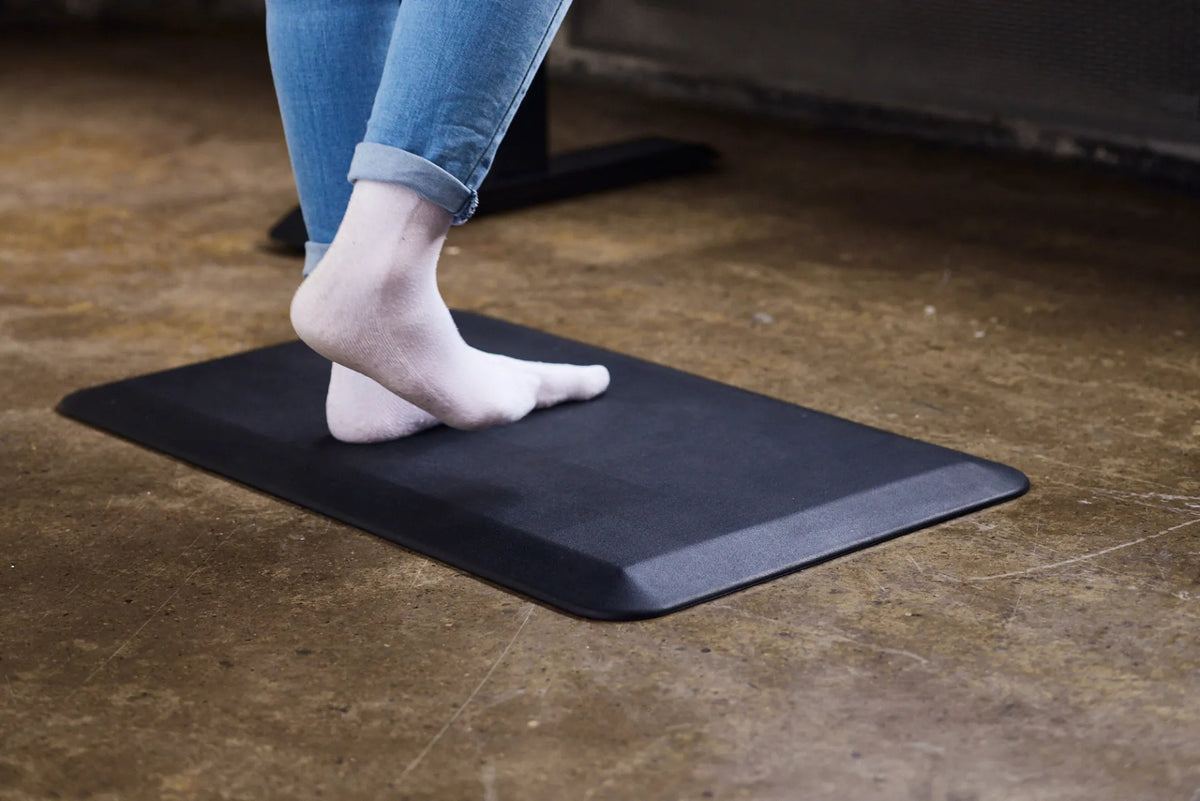
An anti-fatigue mat is used where the person stands. CCOHS guidance for sit-stand workstations says one may be considered where appropriate, along with supportive footwear and weight shifting. It should not sit under a desk foot unless the manufacturer explicitly designed it for that load. A soft mat under only one part of the base creates an uneven support surface.
Place the mat where both feet can fit comfortably at standing height, then move or store it before rolling the chair into the same zone. The Burotic Anti-Fatigue Mat can be evaluated for this purpose using its current dimensions and care instructions.
Plan the chair for carpet
Carpet changes rolling resistance. Confirm that the chair's casters are intended for the surface and that the user can move without pulling on the desk. More resistance is not automatically safer; it may encourage awkward force or cause the chair to catch at a mat edge. Keep cables and loose rug corners out of the rolling path.
When measuring clearance, roll the chair through the complete route used to sit down and stand up. Include recline and rotation, not only the chair's parked footprint. If a mat is added, repeat the test and check that all transitions remain flat.
What not to do
- Do not place different desk feet on carpet, bare floor and a rug edge.
- Do not use an anti-fatigue mat as an improvised pad under a desk leg.
- Do not add unstable shims or stack loose materials under the base.
- Do not keep raising a desk that binds, tilts or contacts an obstacle.
- Do not assume every vibration comes from the carpet.
- Do not drill, modify or remove structural parts without manufacturer approval.
A seven-step installation check
- Choose one consistent floor surface for the full base.
- Assemble the frame and top according to the manual.
- Level the empty desk front to back and side to side.
- Test movement at low, middle and intended standing heights.
- Add equipment gradually and distribute it deliberately.
- Route cables, then test the full travel again.
- Recheck glides and level after the carpet has compressed.
Carpet is not a reason to reject a standing desk. It is a reason to install more deliberately. Keep every support on a consistent surface, use the designed levelling system, separate floor movement from monitor movement and select chair and standing mats for their actual jobs. A careful setup should remain stable, clear and easy to inspect as the workspace changes.
Previous article
Laptop-Only Desk Setup: How to Work Comfortably Without a Monitor
Next article
Laptop-Only Desk Setup: How to Work Comfortably Without a Monitor