





Office Chair for Long Hours: What to Look for in Canada

In this article
The best office chair for long hours is not the one with the longest feature list. It is the chair that fits the user, supports the tasks and can be adjusted to work with the desk, keyboard and screen. A chair described as ergonomic may still be too high, too deep or too wide for a particular person.
For Canadian shoppers, begin with measurable fit and a realistic daily routine. Then compare adjustment range, support, materials, maintenance and the return or trial conditions shown by the seller. This guide offers general ergonomic information, not medical advice. Persistent pain, numbness or weakness should be discussed with an appropriate health professional.
Start with fit, not a universal ranking
The Canadian Centre for Occupational Health and Safety guide to ergonomic chairs states that one chair does not fit everyone. Body dimensions, workstation and tasks all matter. That principle is especially important for long days because a small mismatch is repeated for many hours.
Record the user's height, approximate seated elbow height and the distance from the back to the knee. Measure the available legroom and the underside height of the desk. These numbers are more useful than labels such as executive, gaming or ergonomic.
Check the seat-height range
The chair should allow the feet to rest securely on the floor or a stable footrest without strong pressure under the thighs. The knees can be near hip level, but comfort and task demands matter more than a perfect angle. If the chair must be raised to reach a high desk, add a footrest rather than leaving the feet unsupported.
Also check the lowest setting. Shorter users often discover that a chair's published range starts too high once shoes and seat compression are considered. Taller users need enough height without extending the lift beyond its intended range.
Match seat depth to the body
Sit back against the backrest. There should be comfortable clearance behind the knees while the thighs remain supported. A seat that is too deep can push the user forward, removing back support. A seat that is too shallow may provide too little thigh support.
An adjustable seat pan can serve more people, but check its complete usable range. The measurement should be taken from the back-support contact point to the front edge, not from an unrelated part of the frame. The Burotic guide on choosing a chair that fits your body provides a step-by-step measuring method.
Evaluate the backrest and lumbar area
A supportive backrest should meet the user's lower back without creating a hard pressure point. The correct vertical position depends on the person's shape and sitting posture. More pronounced support is not automatically better. The user should be able to sit fully back, breathe comfortably and change posture.
Look for height, depth or firmness adjustment when possible, and test the entire range. The Burotic article on lumbar-support position explains how to find the lower-back curve without treating one fixed height as universal.
Use recline and movement well
A chair for long hours should not lock the body into one pose. A controlled recline can redistribute pressure and support task changes. Check how the tilt starts, whether the tension suits the user and whether the feet remain supported. A mechanism that is technically adjustable but too strong or too weak is not useful.
Alternate upright work with brief supported recline when the task permits. Stand, walk and change activity regularly. CCOHS notes that a good chair cannot solve every issue associated with prolonged sitting. Movement and workstation design remain part of the plan.
Make armrests support the task
Armrests should support the forearms lightly without lifting the shoulders. Height adjustment is the minimum useful check. Width, depth and pivot can help align the arms with a compact or full-size keyboard. At the same time, the rests must allow the chair to approach the desk.
If the armrests collide with the desktop, the user may reach forward to the keyboard. Compare the chair dimensions with the desk edge and any drawer or support below it. An adjustable standing desk can often meet the chair at a better height, but the desk should still provide clear legroom.
Choose materials for the room and routine
Mesh can provide airflow and a flexible surface, while upholstered foam can distribute pressure differently and may feel warmer. Neither category guarantees comfort. Examine the edge shape, fabric feel, support structure and how the material responds after an extended trial.
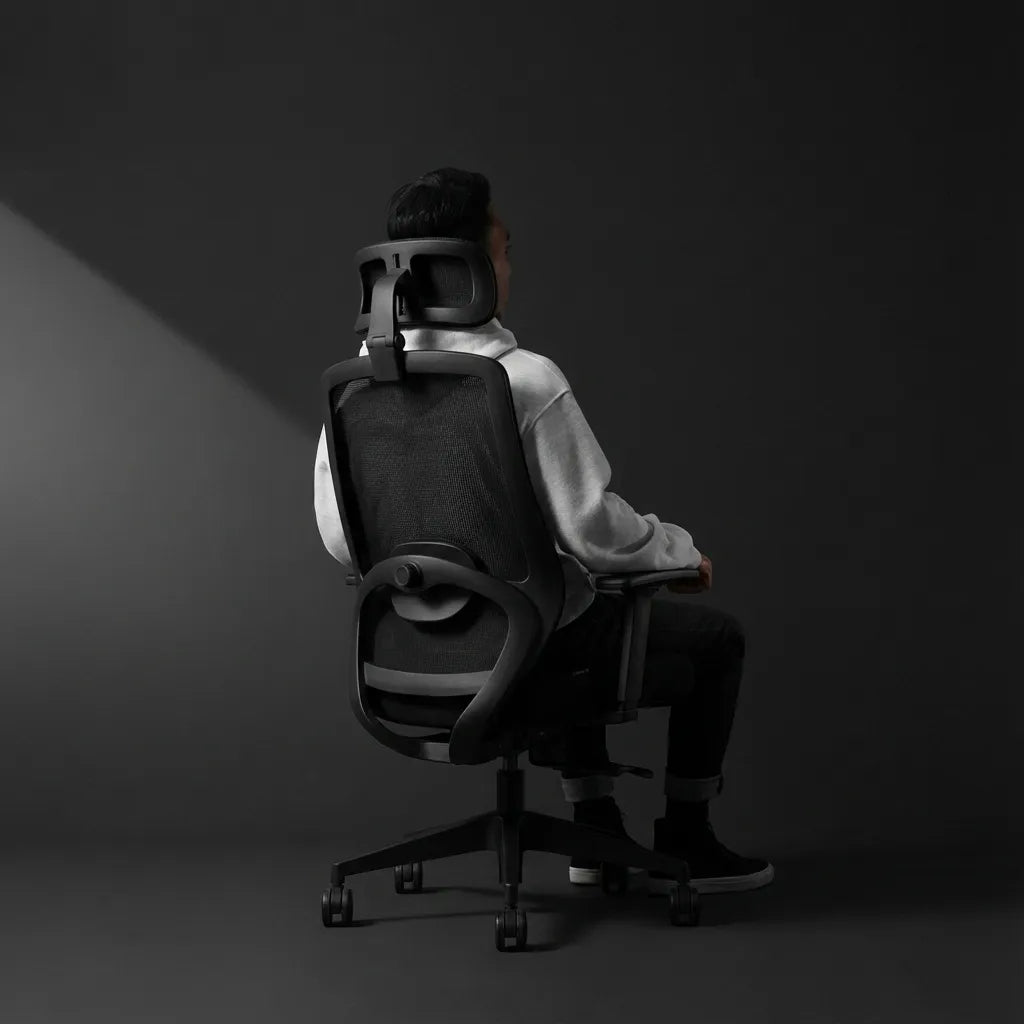
The photo for this article shows a person seated in a black mesh chair with a headrest and visible back support. Those features are visually clear, but the image alone cannot establish fit, adjustment range or performance. Always use the product specifications and a personal fit test.
Decide whether a headrest helps
A headrest is most useful when it supports the head during recline without pushing it forward during upright work. Check height, angle and depth. Some users prefer no contact while typing and support only while leaning back.
If a model offers a removable or optional headrest, compare the chair both ways. The current Loop Ergonomic Headrest is a separate product for compatible configurations. Confirm compatibility on the live product pages before ordering.
Compare real Burotic chair options
The Loop Ergonomic Chair and Peak Ergonomic Chair are current Burotic options with different designs. Rather than assuming one is best for every long workday, compare their live dimensions, adjustments and available configurations with the measurements collected earlier.
Make a short list of non-negotiables before looking at colour or styling. Examples include a low enough seat height, a suitable seat-depth range, armrests that clear the desk and a backrest that supports without pressure. A transparent checklist produces a more defensible choice than counting features.
Test the chair with the complete workstation
The CCOHS chair-adjustment guide recommends starting with the chair, then adjusting the work surface and finally the screen. Sit fully back, set the height and support, bring the keyboard and mouse close, and place the display for a relaxed head position.
Work through normal tasks for more than a few minutes. Type, use the mouse, read, join a video call and recline. Check for pressure behind the knees, raised shoulders, unsupported feet, forward reaching and a backrest that loses contact. Recheck late in the day, when small problems are easier to notice.
Plan maintenance and floor compatibility
Inspect fasteners, controls, wheels and upholstery according to the manufacturer's instructions. Choose casters for the flooring and verify that the chair rolls safely without damaging the surface. Hair and debris around wheel axles can affect movement.
A chair used every workday is a mechanical product. Ask what parts can be replaced and how service is handled in Canada. Do not invent a maintenance schedule. Follow the documentation for the exact model.
A long-hours chair checklist
- The seat height works with the user's feet and the desk.
- The seat depth leaves comfortable space behind the knees.
- The backrest supports the lower back without a pressure point.
- The recline moves smoothly and can be controlled by the user.
- The armrests support the arms and clear the desktop.
- The seat material remains comfortable during a realistic trial.
- The base and casters suit the floor and work area.
- The seller's current service, return and warranty information has been read directly.
Choose for the person and the work
An office chair for long hours should reduce avoidable mismatches, allow posture changes and integrate with the complete workstation. No chair eliminates the need for movement, and no feature compensates for poor fit. Measure first, compare live specifications and test the chair through real tasks.
Use Burotic's guide for long computer and coding sessions for more detail on keyboard, monitor and chair coordination. Then compare the current chair pages with the user, desk and workday in mind.

Previous article
Power Bar vs. Surge Protector vs. Extension Cord for a Home Office
Next article
Standing Desk Setup for Content Creators: Camera Gear, Editing and Workflow