

Desk Drawer Organization: What to Store and How to Arrange It

In this article
A useful desk drawer is not a miniature storage room. It is a task station for the small items you need often but do not want spread across the desktop. When it is organized well, a pen, charging cable or pair of glasses is easy to find and easy to return. When it is overloaded, every item becomes harder to reach.
This guide offers a practical system for desk drawer organization in a Canadian home office or workplace. It focuses on what you actually use, how the drawer moves and how to maintain the system with little effort.
Define the drawer's job before adding organizers
Start by deciding what the drawer is supposed to support. A drawer used for daily computer work may hold a notebook, pens, glasses, a small cable and personal items. A drawer used for creative work may need measuring tools, markers and media cards. A shared workstation may require fewer personal objects and clearer labels.
Do not buy dividers first. Empty the drawer, group the contents and observe the shapes and quantities. Organizers should fit the tools and the available internal space, not force useful items into arbitrary compartments.
Empty, clean and measure
Remove everything and wipe the drawer according to the material and manufacturer's care directions. While it is empty, measure the internal width, depth and height. Also measure the clearance above the drawer when closed. A tray that technically fits the footprint may still prevent the drawer from closing.
Inspect how the drawer attaches and moves. On an adjustable desk, make sure nothing interferes with the frame, controller, cable tray or your legs. The active Burotic Desk Drawer is designed to complement Aspire desk configurations, but the current dimensions, finish options and installation requirements should be checked on the product page for your exact setup.
Sort everything into four categories
Keep in the drawer
These are small items used at the desk at least weekly. Examples include your preferred pens, a current notebook, reading glasses, sticky notes, a short charging cable, a calculator or a compact headset case. The list should reflect your work, not a generic office checklist.
Keep elsewhere
Bulky supplies, archives, replacement stock and rarely used tools belong in a cabinet, shelf or storage box. Ten spare pens do not need to occupy the prime drawer if one or two are enough for the week. Printer paper, binders and unopened electronics are usually better stored away from the immediate work zone.
Relocate to the desktop
An item used continuously may be more practical on the surface. A mouse, keyboard and active water bottle should not be opened and closed into a drawer all day. The drawer is ideal for items that need to be close but not constantly visible.
Recycle, donate or dispose safely
Remove dried pens, duplicate promotional items and supplies you never use. Handle batteries and electronics through an appropriate local recycling or disposal program rather than placing them in household garbage without checking municipal guidance. Protect personal information on old notes before recycling them.
Arrange the drawer by frequency and reach
Put the most frequently used items closest to the opening and nearest your dominant hand. Place occasional items toward the back. Keep the centre clear enough that you can see categories without removing several layers.
This frequency-based approach is more durable than arranging only by colour or appearance. A beautiful tray that hides the item you use every hour will not stay organized. The best layout makes the correct action the easy action.
Create a daily zone
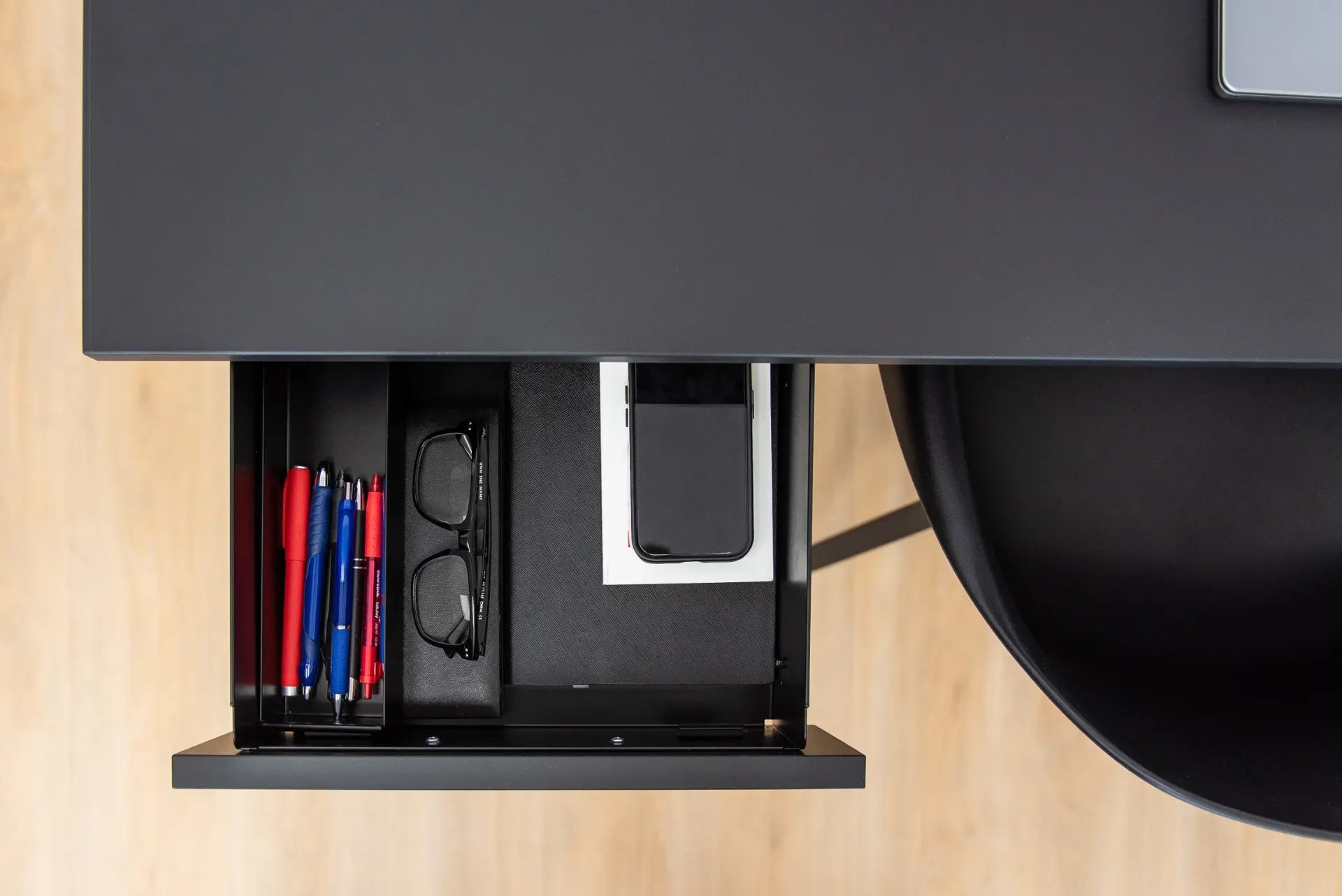
The front section can hold one or two pens, glasses, a small notepad and the cable used most often. These items should be visible as soon as the drawer opens. Avoid stacking them.
Create a support zone
The middle section can hold items used a few times per week: sticky notes, a ruler, earbuds, adapters or a calculator. Small containers keep these objects from sliding together, but leave enough space to grasp each item.
Create a reserve zone
The back section can hold a limited number of refills or occasional tools. Set a maximum quantity. When the reserve exceeds that limit, move extras to central storage instead of adding another layer.
Choose organizers that fit the work
Modular trays are useful because the layout can change. Shallow dividers suit pens and clips, while a larger open area fits a notebook or glasses case. Non-slip liners may reduce movement, but verify that the material is appropriate for the drawer finish and will not trap debris or transfer colour.
Canadian retailers such as IKEA Canada and Staples Canada show a broad range of trays, dividers and desk accessories. Treat these as examples of organizer types, not a shopping requirement. Reuse small boxes or containers when their edges are smooth, their height fits and they remain stable.
Avoid over-dividing
Too many tiny compartments create a maintenance problem. Categories change as projects change. Use the fewest sections that keep objects separate and visible. A simple layout of writing tools, electronics and personal items is often easier to maintain than a dedicated slot for every object.
Protect electronics and delicate items
Do not toss loose metal objects against a phone, glasses or storage media. Use a soft case or separate compartment. Keep liquids, food and leaking pens out of the drawer. Do not coil charging cables so tightly that connectors are stressed, and avoid closing the drawer on a cable that remains connected to a device.
If a powered device charges inside a drawer, follow its manufacturer's ventilation and charging instructions. An enclosed drawer is not automatically an appropriate charging location. Keep power bars and adapters installed where heat, strain relief and access can be managed safely.
Coordinate the drawer with the desktop
The drawer should reduce surface clutter without hiding everything you need. Start with the active desktop zones. Keep the monitor, keyboard, mouse and current task materials in place. Move only secondary items into the drawer.
Burotic's minimalist desk setup guide recommends reducing clutter without sacrificing ergonomics. That principle applies here: do not move the mouse farther away or block knee space merely to achieve a cleaner look.
Plan around cables
A drawer can collide with hanging cables or encourage users to trap a charging lead in the slides. Route permanent cables separately and give movable leads a defined storage spot. The Burotic guide to standing desk cable management explains how to plan movement through the full height range.
Check legroom and movement
Under-desk storage occupies space that might otherwise be available to your thighs and knees. Sit in your usual chair at your preferred height before finalizing the location. Open the drawer fully and check that you can access it without twisting sharply or rolling far away.
Then raise and lower an adjustable desk through its full travel while watching the drawer, frame, chair arms, cables and nearby furniture. Stop if there is interference. Never assume that clearance in one position guarantees clearance everywhere.
Use a short reset routine
An organization system succeeds when it is easy to restore. At the end of the day, return the pen, close the notebook, coil the loose cable gently and remove cups or food. This should take less than two minutes.
Once a month, remove receipts, obsolete notes and duplicate supplies. When the drawer begins to resist closing, do not press harder. Treat it as a signal to review the contents. A one-in, one-out rule works well for pens, adapters and promotional items.
What should not go in a desk drawer?
- Open drinks or food that can spill or attract pests.
- Heavy objects beyond the drawer's stated capacity.
- Loose batteries or electronics stored against metal objects.
- Confidential papers without appropriate security.
- Medication that requires specific storage conditions.
- Large quantities of flammable or hazardous materials.
- Cables connected across the moving path of the drawer.
- Anything that prevents the drawer from closing normally.
A 15-minute desk drawer organization plan
- Empty the drawer completely.
- Clean and measure the interior.
- Group items by use, not appearance.
- Remove duplicates, waste and unrelated objects.
- Select the small set needed weekly.
- Place daily items at the front.
- Place occasional items in the middle or back.
- Add only the dividers needed to stop mixing.
- Test opening, closing, legroom and desk travel.
- Take a quick photo so the intended reset is easy to remember.
Keep the system simple
Good desk drawer organization is less about fitting more into the drawer and more about reducing search, clutter and repeated movement. Give the drawer one clear job, keep only frequently used items, arrange them by frequency and preserve safe clearance.
A well-organized drawer should feel slightly underfilled. That open space makes items visible and leaves room for the current project without turning the drawer into permanent overflow.


Previous article
How to Set Up a Desk for Computer Work and Handwriting
Next article
Standing Desk Clearance Guide: How Much Space Do You Need?