

How High Should a Balance Stool Be? Sitting and Perching Guide

In this article
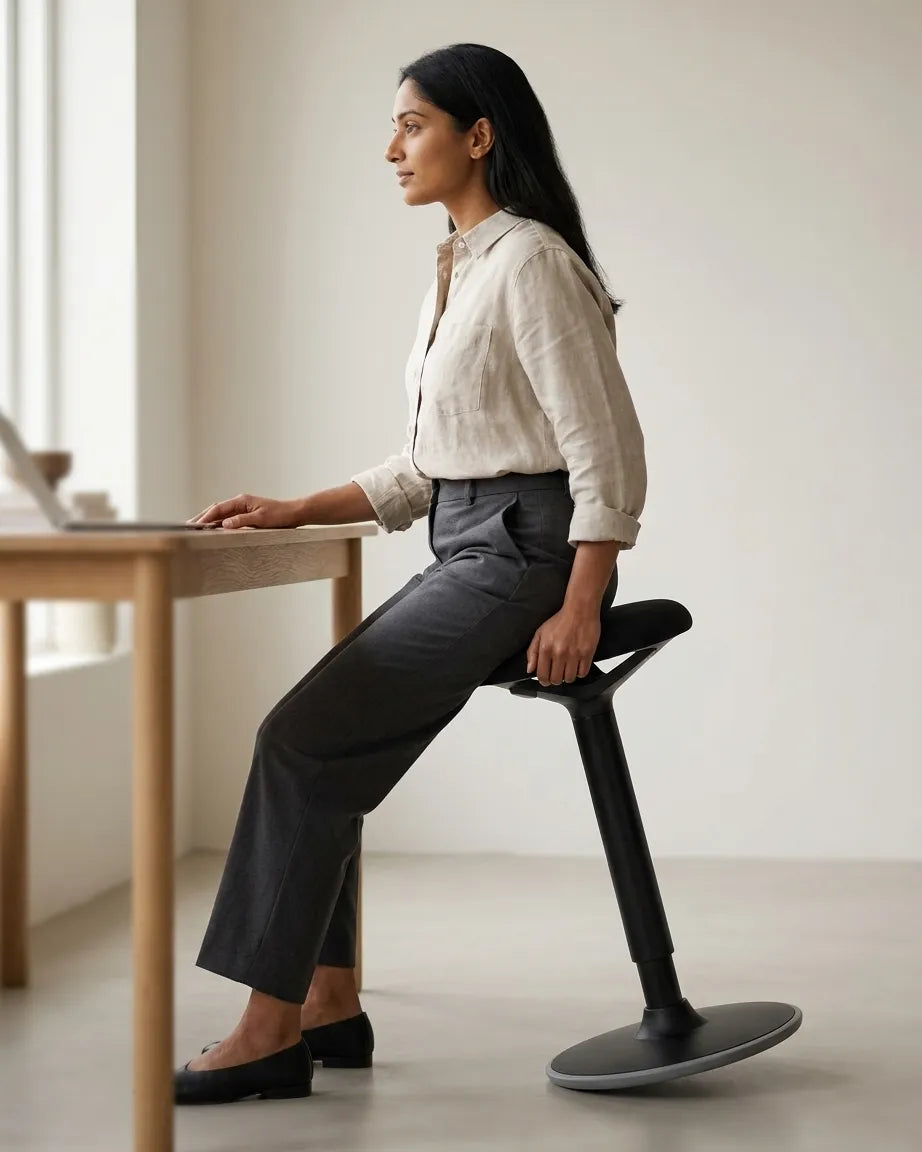
The correct balance stool height depends on how you intend to use it. For supported sitting, the seat is usually lower and the feet carry less of the body's weight. For perching, the seat is higher, the hip angle is more open and the feet remain firmly engaged with the floor. The right setting is not a universal measurement. It is the height that keeps the stool stable, the feet supported and the task within comfortable reach.
A balance stool is not a replacement for every chair or a treatment for discomfort. It is one option for varying position during suitable tasks. Start conservatively, use it for short periods and follow the product instructions. Pain, dizziness, balance concerns or persistent symptoms should be discussed with a qualified health professional.
Decide whether you are sitting or perching
Supported sitting
In a seated use, place most of the pelvis on the centre of the seat. Keep both feet on the floor and avoid wrapping them around the base. The knees may be near or somewhat below hip level depending on the stool, body and task. You should not feel that you are sliding forward or using the desk edge to keep yourself upright.
Light perching
Perching sits between conventional sitting and standing. Raise the stool so the legs accept more weight while the seat still supports the pelvis. Both feet remain flat and separated enough to create a stable base. The seat should not press sharply into the back of the thighs or make you brace against the desk.
The distinction matters because copying a chair height often makes a perch too low, while copying standing desk height can leave the seat too high to mount and exit safely.
Use a step-by-step height adjustment
- Lower the standing desk so it will not interfere with the initial stool adjustment.
- Place the stool on a level, dry surface with clear space around the base.
- Begin at a modest height and sit in the centre while holding a stable support if needed.
- Confirm that both feet are flat and can accept weight.
- Raise the seat gradually for a more open hip angle or light perch.
- Stop if the feet lose reliable contact, the seat feels difficult to enter or the body slides.
- Bring the desk to the hands only after the stool position is stable.
Adjust one variable at a time. If you move the stool and desk together, it becomes difficult to identify which change improved or worsened the setup.
Coordinate the desk with the stool
Once the stool is stable, set the work surface near elbow height for the actual task. Keep shoulders relaxed and the upper arms near the torso. A high perch usually needs a desk height between the person's seated and standing presets. Save it as a separate memory position if the controller permits.
Do not set the stool height merely to reach a fixed surface that is much too high. That can reduce foot support and make entry awkward. A height-adjustable desk lets the work come to the person. Burotic's task-based sitting and standing guide helps decide which position suits different kinds of work.
Keep the feet active and supported
Both feet should remain in contact with the floor during sitting and perching. A narrow stance may feel unstable, while an extremely wide stance can make the hips work unnecessarily. Start around a natural standing width and adjust for the stool's base and your footwear.
A footrest designed for chair sitting may not be suitable for a moving or perching stool because it reduces the support area and can create a trip point. Do not place the stool on an anti-fatigue mat unless the manufacturer allows it and the base remains stable. The Burotic Anti-Fatigue Mat is intended for standing tasks, not as an improvised levelling pad.
Check pressure and reach
A seat that is too high can concentrate pressure, reduce foot contact and make the user slide. A seat that is too low can close the hip angle and turn the stool into an unsupported low chair. In either case, the desk may then appear to be the problem because the hands no longer meet it comfortably.
Type for several minutes and use the mouse. The shoulders should not rise, the wrists should not rest on a hard edge and the torso should not lean forward to reach the screen. Reposition equipment before using the desk as a brace.
Use short trials instead of an all-day switch
The CCOHS guidance for sit-stand workstations recommends changing position and avoiding prolonged static standing. The same principle supports a varied schedule with a stool. Start with a short, low-risk task such as reading messages or joining a call, then return to a supportive chair or standing position.
Do not wait for discomfort to force a change. Use task boundaries, calendar breaks or the end of a meeting as prompts. A balance stool introduces movement, but it does not remove the need to walk and change activity.
Match the stool to the task
Light perching can suit conversations, reviewing documents and brief computer tasks. Detailed design work, long writing sessions and tasks requiring very steady hands may feel better in a supportive chair. Standing may be useful for a short call or a task that involves moving around the room.
Use the Burotic comparison of an active stool and ergonomic chair to choose the main seat for each task. The question is not which option wins, but which one supports the required duration, precision and body position.
Check entry, exit and floor space
Approach the stool from a stable position and make sure its base is not hidden under the desk. Lower it before the first use if mounting feels uncertain. Keep cords, rug edges and loose objects away from the feet. If the stool rocks by design, learn the range with hands free of hot drinks and delicate equipment.
Leave enough clearance to step away without hitting the desk frame. A stool may occupy less visual space than a chair but still needs a clear base and exit path. Move it out of the standing zone when it is not being used.
Use the product controls as designed
The Burotic Balance Stool is currently offered in black and white. Review its live dimensions, adjustment method and instructions before use. Do not modify the cylinder, base or seat to obtain a height beyond the intended range.
Inspect the base and controls periodically. Stop using the stool if a part is loose, damaged or behaves unexpectedly. Cleaning products should be appropriate for the seat and base materials.
A practical final check
- The stool stands on a level, clear surface.
- The pelvis is centred on the usable seat area.
- Both feet maintain secure floor contact.
- The seat does not create sharp pressure behind the thighs.
- The desk meets relaxed elbows without becoming a brace.
- The screen is readable without leaning forward.
- Entry and exit remain controlled.
- The stool is one position in a varied workday.
The best balance stool height is found through a stable sequence: choose sitting or perching, set the feet, adjust the seat gradually, then bring the desk to the hands. Use short trials and keep a supportive chair and standing available. Variation, not one perfect height, is the practical goal.
Previous article
Standing Desk Setup for Video Calls: Camera, Light and Background
Next article
How to Reset an Aspire Standing Desk Base: Error Codes and Solutions