





Where Should Your Feet Be When Standing at a Desk?

In this article
Your feet should begin in a comfortable, balanced position under your hips, with both soles fully supported and enough room to shift, step and change stance. They do not need to stay parallel or planted in one exact spot. At a standing desk, a stable starting position is useful, but frequent small changes are more important than holding a perfect pose.
This guide explains how to place your feet, coordinate them with desk height, use an anti-fatigue mat or footrest and recognize when the setup needs adjustment. It offers general ergonomic information, not a diagnosis or treatment plan. Persistent pain, numbness, swelling, weakness or loss of balance should be discussed with a qualified health professional.
The quick answer: start balanced, then keep moving
Stand facing the centre of your work. Place your feet about hip-width apart or at another naturally comfortable width. Keep the whole foot supported rather than leaning continuously on the toes, heels or outer edges. Let the knees remain relaxed instead of deliberately locking them. Your weight should feel reasonably even at first, but it is normal to transfer some weight from one leg to the other as you work.
The Canadian Centre for Occupational Health and Safety recommends enough space to change working position and suggests a foot rail or portable footrest so a worker can shift weight between the legs. Its sit-stand desk guidance also recommends changing position and occasionally shifting weight. The practical lesson is simple: your stance needs room and variety.
Build a neutral starting position
Face the task
Point your hips and shoulders toward the keyboard and primary screen. If your feet face one direction while the monitor sits off to the side, the twist usually travels up through the knees, hips and trunk. Move the screen or the whole workstation before trying to correct the problem only at the feet.
Use a stance that feels natural
Hip-width is a useful starting description, not a measurement that suits every body. A slightly narrower or wider stance may feel better depending on body proportions, footwear and the surface underfoot. You should be able to take a small step without first untangling crossed feet or backing away from the desk.
Keep both soles supported
Use a level, stable surface. Avoid standing with one foot partly off a mat or with a raised mat edge under the arch. If you use socks, make sure the combination of socks, mat and floor does not slip. If you wear shoes, the sole should sit securely and should not catch on the edge when you step.
Do not lock yourself into one stance
Static standing can become uncomfortable even when the initial posture looks good. Alternate among several supported positions: even weight on both feet, slightly more weight on the left, slightly more on the right, one foot on a low rail, or a brief step away from the desk. These changes should be calm and frequent rather than large, sudden shifts.
A simple cue is to change something whenever you finish a small task. After sending an email, move one foot. After a call, take a short walk. When you switch from typing to reading, place one foot on a stable footrest. These task-based cues are easier to remember than trying to maintain a rigid schedule.
What about crossing your ankles?
A brief crossed stance is not automatically a problem, but it narrows the base of support and can encourage leaning to one side. If you repeatedly cross the same way or feel unstable, return to two supported feet and create variety with a low footrest instead.
Should the knees stay bent?
You do not need a visible squat. The goal is simply to avoid forcefully locking the knees while you remain still. A relaxed stance permits small adjustments. If you must bend deeply to reach the keyboard, the desk is probably too low. If you rise onto your toes or shrug your shoulders, the surface may be too high.
Coordinate foot position with desk height
Foot placement cannot fix a poorly set work surface. Stand close enough that your upper arms can hang near your sides. Bring the desktop or keyboard area close to relaxed elbow height, then test whether you can type and use the mouse without leaning forward or raising your shoulders. The correct desk setting may change with footwear and with the thickness of a mat.
If the mat raises you by a noticeable amount, recheck the standing preset. Our guide to standing desk height for short and tall users explains how to coordinate the work surface with your elbows, screen and input devices.
How to use an anti-fatigue mat
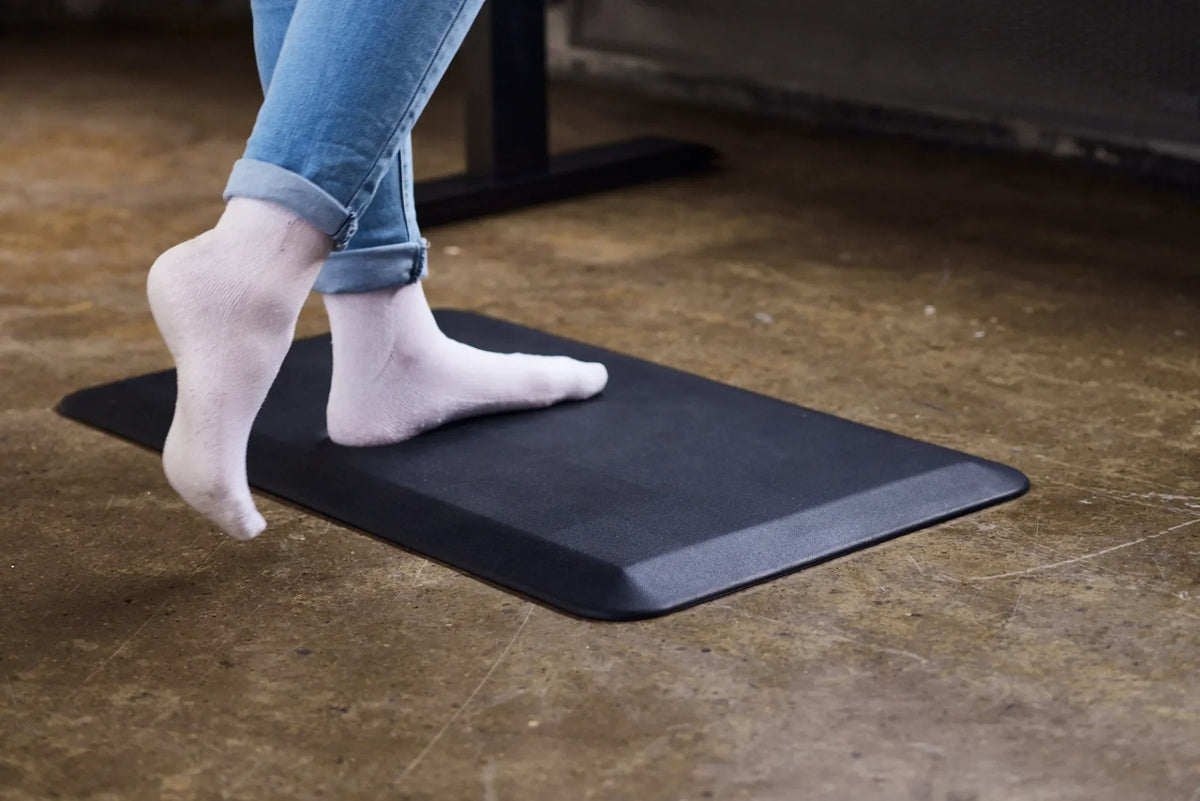
The photo shows socked feet changing position on a black anti-fatigue mat over a hard floor. A mat can provide a defined, cushioned standing area, but it should not become a platform that prevents movement. Choose enough usable surface for your normal stance and small steps. Keep all edges flat and outside a regular walking route whenever possible.
A mat should be firm enough for stable footing and should not curl, slide or create a sharp transition. Inspect it periodically for wear. If you feel less stable, if a chair catches the edge, or if the mat forces one foot onto the bare floor, reposition or replace it. The anti-fatigue mat guide covers selection, placement and practical tradeoffs.
Barefoot, socks or shoes?
The best choice depends on the workplace, floor, mat, task and individual needs. A photograph of socks does not mean socks are suitable for every setting. In a shared or commercial workplace, footwear policies and safety hazards take priority. At home, compare traction, support and comfort while keeping the surface clean and clear.
Use a footrest to create a second position
A low, stable footrest or rail lets you place one foot higher for a short period and transfer load between the legs. It should be easy to reach without twisting and low enough that the pelvis does not hike sharply on one side. Alternate feet rather than always raising the same one.
Do not use a rolling box, loose stack of books or desk-frame component that was not designed as a step. The support should stay put when touched and should not interfere with the moving desk. Before raising or lowering the desktop, verify that the footrest, mat and cables remain clear of the frame.
Common foot-position mistakes
- Standing too far from the desk: the feet stay back while the torso leans forward. Move closer and keep knee and toe clearance.
- Living on one hip: most weight stays on the same leg for long periods. Use deliberate, gentle side-to-side changes.
- Rising onto the toes: the desk or screen may be too high, or the user may be reaching for something.
- Keeping the feet trapped: boxes, chair bases and cable bundles prevent stepping. Clear a movement zone.
- Standing half on the mat: the feet rest at different heights. Centre the mat or choose a larger usable area.
- Trying to stand all day: a sit-stand workstation is intended to support variation, not replace one prolonged posture with another.
A five-minute setup test
- Clear the floor and confirm that the mat or floor surface is stable.
- Stand facing the screen with both feet fully supported.
- Set the desk near relaxed elbow height and bring the keyboard and mouse close.
- Type for one minute, then shift weight and place one foot on a stable support if available.
- Raise and lower the desk once while watching the mat, footrest and cables.
- Step away and return. Nothing should block your normal approach.
If the test works only when you lean, lock the knees or keep one foot in a single spot, change the desk height or equipment placement. The broader standing desk adjustment guide by body area can help identify what to check next.
When should you sit or walk?
Change position before discomfort becomes the only reminder. Sitting, standing, leaning and walking all load the body differently. CCOHS guidance emphasizes variation. A short walk to refill water or speak with a colleague often creates more movement than continuing to shuffle in place.
There is no universal standing interval that fits every person and task. Begin with manageable periods, use supported postures and adjust based on comfort and work demands. Our standing desk transition plan offers a gradual approach.
The practical answer
Start with both feet fully supported beneath you, roughly hip-width apart, while facing the task. Keep enough floor space to shift, step and occasionally raise one foot on a stable support. Do not force your feet to remain parallel, keep your knees locked or treat one position as correct for the entire day.
Good standing posture is dynamic. Set the desk around your relaxed upper body, use the floor or mat for stable support, and make frequent small changes. If symptoms persist despite reasonable adjustments, seek qualified advice rather than trying to solve a health problem through foot position alone.

Previous article
Can You Plug a Standing Desk Into a Power Bar?
Next article
Why Is My Standing Desk Controller Not Responding?