





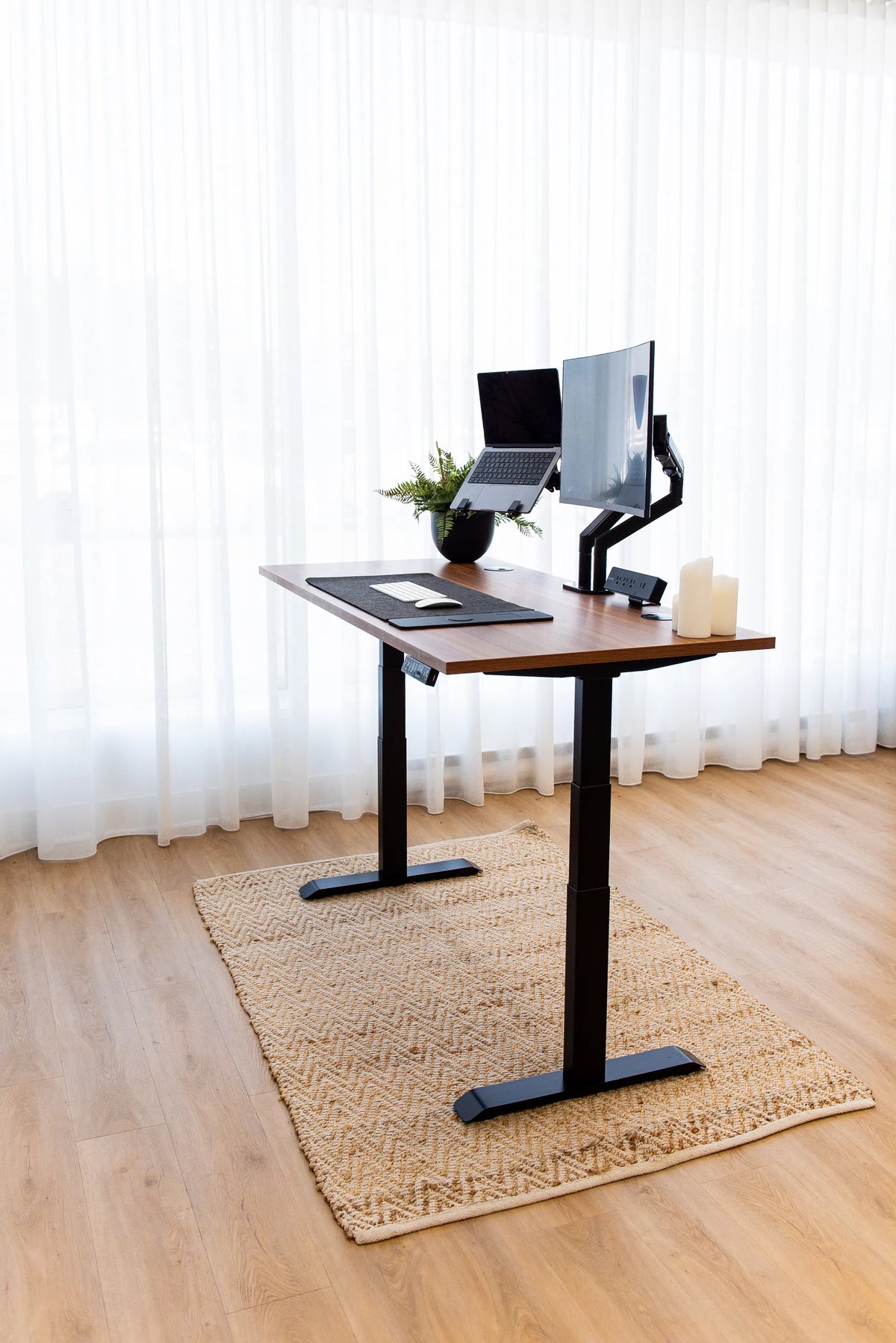
How to Choose and Position a Rug Under a Standing Desk

In this article
An area rug can make a home office feel warmer, quieter and more intentional. Under a standing desk, however, it is also part of the workstation. Its size, thickness and position can affect how evenly the desk feet sit, how easily the chair rolls and whether cables remain clear while the desk moves. The best rug under a standing desk is not simply the one that matches the room. It is the one that supports the complete working zone without introducing a soft, uneven or awkward surface.
This guide focuses on movable area rugs, not wall-to-wall carpet or an anti-fatigue mat. If your room is already carpeted, see our separate guide to putting a standing desk on carpet. An anti-fatigue mat serves a different purpose and normally belongs where you stand, rather than under the entire desk.
Start with the desk footprint, not the desktop size
Measure the actual footprint on the floor before shopping for a rug. The desktop may be 60 or 72 inches wide, but the base feet, chair zone and cable path determine how much floor the setup really uses. Lower the desk, note the outside edges of both feet and measure from the front of the feet to their rear edge. Then raise the desk and confirm that no moving part changes that footprint.
Add the space used by the chair. Pull the chair back as far as you normally do to stand up, then mark where the casters finish. The standing desk clearance guide explains why the usable workstation is larger than the desk alone. A rug that covers only the feet may look neat, but it can leave the chair repeatedly crossing a raised edge.
Choose one of three practical rug layouts
1. Desk feet fully on the rug
This is the most visually unified option. Both feet and the entire space between them sit on one continuous surface. It works best when the rug is low pile, dense and large enough that neither foot is close to an edge. Keep all levelling pads on the same material. If one pad sits on the rug and another sits on the hard floor, the base may rock even when the floor itself is level.
2. Desk and chair fully on the rug
A larger rug can define the full work zone and avoid a chair crossing the edge. This layout is comfortable in a bedroom or open living area, but it demands more careful sizing. The rug should extend behind the chair at its farthest normal position and should not create a curled corner in a walking path. A chair with casters will usually move more slowly on textile flooring than on a hard surface, so test the feel before committing.
3. Rug placed in front of the desk
Leaving the desk feet on hard flooring and placing the rug in the chair or standing zone can preserve maximum base stability. The tradeoff is that the front edge of the rug must be far enough from the desk feet and cables to prevent bunching. This layout is often useful when the room needs visual softness but the desk is frequently moved for cleaning or reconfiguration.
Low pile is usually the safest starting point
A flatwoven or low-pile rug creates a more predictable platform than a thick, plush rug. Dense fibres compress less under the desk feet, make levelling easier and reduce resistance when a chair rolls. A very soft rug can develop four deep impressions that are not equal, especially if the floor underneath is also flexible. It can also make a mobile filing cabinet or chair feel unstable.
Thickness is not the only factor. A loosely woven rug may stretch or ripple, while a dense rug with a thin profile can remain stable. Check the backing, edge construction and whether the manufacturer recommends a separate rug pad. If you use a pad, it should cover the supported area evenly. Do not place small pads under only some desk feet as a substitute for levelling.
Keep the base level and test it at full height
Position the empty desk first. Confirm that every foot is fully supported, then adjust the levelling glides according to the product instructions. Place a hand on each front corner and apply gentle pressure. The desk should not rock. Raise the desk to your usual standing height and repeat the check because movement is easier to notice when the columns are extended.
A rug does not correct a loose or poorly assembled base. If the desk moves excessively, work through the fastener, levelling and load checks in our standing desk wobble troubleshooting guide. Do not use folded fabric, books or improvised shims under a powered desk.
Plan for the chair before choosing the rug
Think about how you transition from sitting to standing. If the chair remains on the rug, its casters need a firm path and enough space to roll back. If the chair starts on the rug and ends on hard flooring, each transition crosses an edge. That may be acceptable for an occasional visitor chair, but it becomes irritating during a full workday.
A chair mat can help on some rugs, but it adds another layer and its dimensions must suit the caster path. Check that the mat lies flat and does not slide toward the desk. For a thick rug, consider keeping the chair and desk on the same hard surface and using the rug as a visual boundary elsewhere in the room.
Protect the moving cable path
Standing desks need slack between the desktop and the fixed power source. A rug should not hide a loose cable where a caster or desk foot can catch it. Route power from the wall to a fixed point near the base, then allow the managed cable bundle to travel with the desktop. The CCOHS guidance for sit-stand workstations specifically recommends arranging cables, storage and the general layout so they do not interfere with desk adjustment.
Run the desk from its lowest to highest position while watching every cable. Check the back edge of the rug, any floor grommet and any power bar. The rug should remain still, and no connector should be pulled. For a complete moving-cable plan, use the standing desk cable management guide.
Use rug size to balance the room
A rug that is only slightly wider than the desk can make a large setup look cramped. A rug that fills most of a small room can make the desk feel integrated, but it may also block doors or floor vents. Use painter's tape to mark the proposed rug dimensions. Raise and lower the desk, roll the chair, open nearby drawers and walk through the room before buying.
For a desk against a wall, leave a deliberate gap or extend the rug clearly beneath the setup. Avoid an accidental narrow strip of exposed flooring. In an open room, aligning the rug with the desktop or the wall can make the workstation look calmer. The rug colour can echo the desktop, base or chair, but visual choices come after functional clearances.
Account for cleaning, moisture and seasonal movement
Dust and grit collect under a workstation, especially around casters and levelling feet. Choose a rug that can be vacuumed without repeatedly moving the desk. If it must be lifted for cleaning, lower the desk, unplug it and remove equipment before repositioning the base. Never pull a rug out from under a loaded powered desk.
Check edges periodically for curling, especially after cleaning or seasonal humidity changes. Inspect the floor beneath the rug according to the flooring manufacturer's care instructions. A non-slip pad may help prevent drift, but confirm that its material is compatible with the floor finish.
A quick sizing checklist
- Measure the outside edges and front-to-back depth of the desk feet.
- Mark the chair's farthest normal position.
- Keep every levelling pad on the same continuous surface.
- Prefer a dense, low-pile construction for easier levelling and rolling.
- Keep rug edges away from moving cables and regular walking paths.
- Test stability at both sitting and standing heights.
- Confirm doors, drawers, vents and nearby furniture remain usable.
Final recommendation
For most standing desk workstations, a dense low-pile rug that supports both base feet completely is the most reliable choice. Make it large enough to avoid half-supported feet and repeated caster crossings. If the chair cannot move comfortably on the rug, keep the desk and chair on hard flooring and use the rug to define an adjacent zone instead.
The right result should feel uneventful: the desk stays level, the chair moves predictably, cables remain clear and the rug improves the room without becoming another adjustment problem. If you are planning a new setup, compare the available Aspire wood laminate standing desk sizes with the room and rug dimensions before deciding on the final layout.
Sources: CCOHS, Sit/Stand Desk; CCOHS, Space Requirements for Office Work.

Previous article
How to Decorate a Standing Desk Without Blocking Its Movement
Next article
Under-Desk Drawer vs. Filing Cabinet: Which Storage Fits Your Workspace?