





Standing Desk on a Concrete Floor: Comfort and Setup Guide

In this article
A standing desk can work well on a concrete floor, but the floor changes how the workstation feels and behaves. Concrete is hard, often cool and unforgiving of small levelling errors. The solution is not to stand all day or to cover the entire room in thick foam. It is to create a stable base, add comfort where your feet actually land and keep changing position.
The Canadian Centre for Occupational Health and Safety, or CCOHS, notes that hard concrete floors are among the least comfortable surfaces for prolonged standing. It also cautions that an anti-fatigue mat is only one part of a broader solution. Footwear, work design, posture changes and opportunities to sit all matter.
Quick answer: use a firm mat and alternate positions
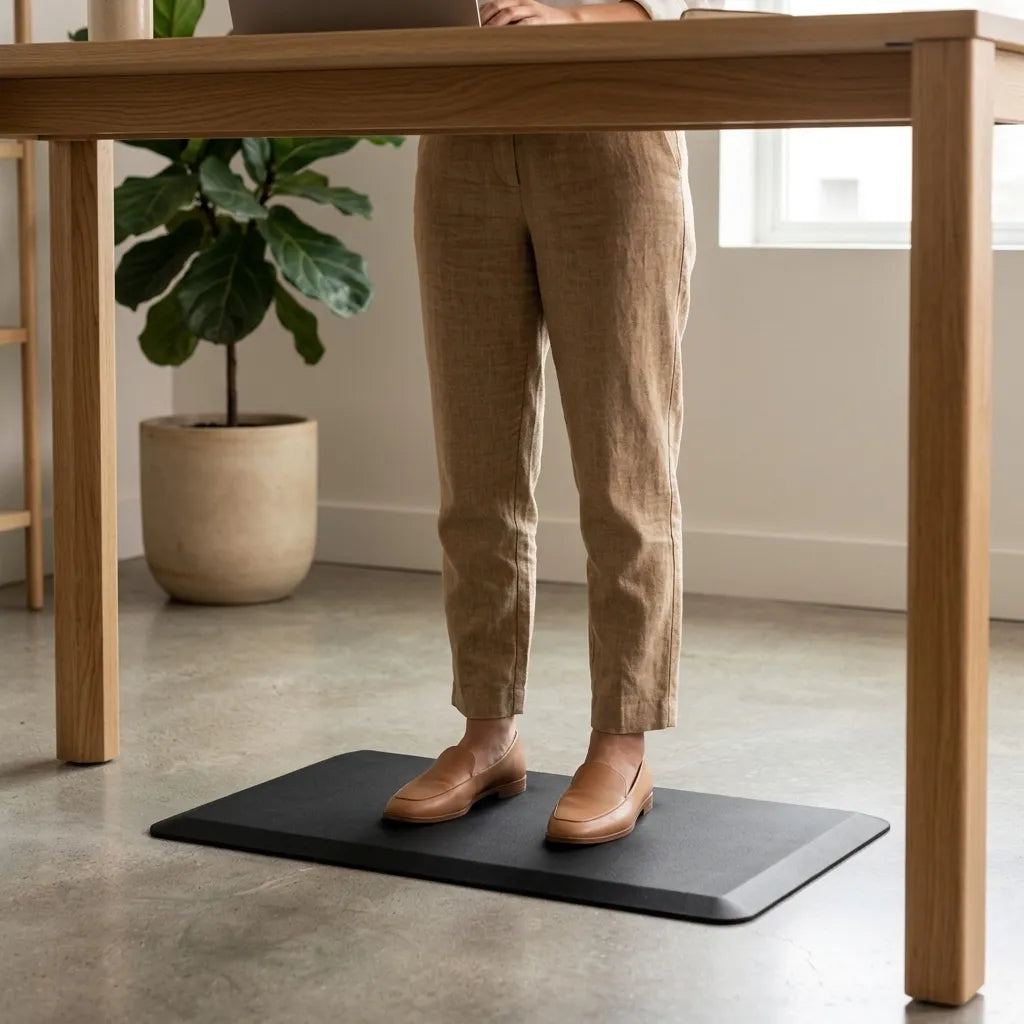
Place the desk feet directly on the concrete or on a single, stable floor surface. Level the frame before loading it. Put a properly sized anti-fatigue mat only in the standing zone, where it will not sit beneath the desk feet or create a rolling hazard for the chair. Wear footwear that feels stable on the chosen surface, then alternate sitting, standing and short movement breaks.
This approach protects desk stability while reducing the concentrated pressure of standing on bare concrete. It also makes the mat easy to move when the chair needs the same space.
Why concrete needs a different setup
Hardness affects comfort
Concrete does not yield underfoot. Remaining still on it can make the feet and lower legs feel tired sooner than on a slightly resilient surface. A mat can introduce modest cushioning, but excessive softness may make balance less predictable and encourage the ankles to work continuously.
Small floor variations affect the frame
A slab may look flat without being perfectly level. If one foot does not make full contact, the desk can rock when typing or when its height changes. Check every levelling glide before assuming the frame itself is loose. The standing-desk wobble guide explains a useful sequence for separating a floor problem from an assembly problem.
Concrete can be cold and acoustically live
In a basement or converted commercial space, concrete may feel cool and reflect sound. Footwear and a small mat can help with the immediate contact surface. Soft furnishings elsewhere in the room may reduce echo, but they should not obstruct the moving desk or cover outlets.
Choose the mat by function, not thickness alone
A standing mat should be large enough for a comfortable stance and small steps, yet compact enough to stay clear of the desk feet, chair path and nearby doorways. Its edges should lie flat. A bevelled perimeter can reduce abrupt edges, but the mat still needs regular inspection for curling, tears or sliding. The Burotic Anti-Fatigue Mat is one current product to compare with the measured standing zone.
Look for a surface that offers traction with the footwear you normally use. A very soft mat may feel pleasant for a few minutes but become unstable during longer tasks. A very small mat can discourage position changes. Test whether you can shift weight and change foot position without stepping onto an edge.
Do not place a desk levelling foot partly on and partly off the mat. That creates unequal support. The desk belongs on the floor; the mat belongs in the user's standing area.
Plan the sitting and standing zones together
A mat can conflict with chair casters if both occupy the same footprint. Decide how you will change modes before buying. Some users slide a light mat aside when sitting. Others choose a mat that can be moved with one hand and stored upright nearby. Avoid leaving it where a chair wheel can catch the edge.
If the chair is difficult to roll on concrete, inspect the casters and confirm they suit the surface. Debris can collect around wheels and scratch sealed floors. A chair mat may protect the surface, but stacking a soft anti-fatigue mat over a chair mat creates an uneven transition. Use each product in its intended zone.
Use footwear as part of the system
CCOHS recommends comfortable footwear with suitable fit and support for standing work. The best choice depends on the user, the floor and the task. Shoes should grip the mat without sticking during a turn. Socks alone may be comfortable at home but can slip on some surfaces and offer little protection from dropped objects.
Change one variable at a time. If you add a mat and switch footwear simultaneously, it becomes harder to identify what improved or worsened comfort. The guide on shoes at a standing desk gives a fuller comparison of shoes, socks and floor conditions.
Set the desk height after choosing the surface
A mat and shoes raise the body slightly. Set standing height while wearing the footwear and standing on the mat you will actually use. Start with relaxed shoulders, elbows near the body and forearms approximately level with the keyboard surface. Fine-tune from there rather than relying on a generic height chart.
Save a standing memory position only after the whole setup is in place. If you later change to thicker footwear or a different mat, reassess the height. The display value is a repeatable reference, not a universal ergonomic measurement.
Keep the desk stable on the slab
- Remove grit from beneath every desk foot.
- Place the desk in its intended location without the anti-fatigue mat under the base.
- Check that all levelling glides contact the floor.
- Adjust one glide at a time until rocking stops.
- Tighten accessible frame fasteners according to the manufacturer instructions.
- Test at sitting and standing heights with the normal equipment load.
Do not improvise with loose cardboard, folded fabric or unstable shims. If the floor has a significant slope or damage, follow the furniture manufacturer's guidance or seek appropriate installation advice.
Manage cables on a hard floor
Concrete rooms often have limited outlet locations. Plan power before final placement. Cables should have enough slack for the desk's full travel without lying across the walking area. Keep connectors off the floor where moisture, cleaning equipment or chair wheels could reach them.
Run the desk through its complete intended range while watching every cable. Stop immediately if a cord tightens, snags or pulls a power bar. Never route a cable beneath a mat, where damage can remain hidden. Use only electrical products suitable for Canada and follow their instructions.
Standing time matters more than standing still
A standing desk should make position changes easier, not replace one static posture with another. CCOHS recommends varying posture and avoiding prolonged standing. Begin with brief standing periods during suitable tasks, then sit or walk before fatigue builds.
The sit-or-stand task guide can help match posture to calls, focused typing and collaborative work. For a gradual schedule, use the standing-time transition plan. No fixed ratio is right for everyone.
A five-minute setup check
- The desk does not rock at either working height.
- The mat lies flat and does not touch the desk feet.
- The chair can enter and leave without crossing a raised edge.
- Footwear grips the surface and leaves room for the toes.
- Cables remain clear through the full height range.
- You can change position without moving heavy equipment.
When to change the arrangement
Reassess if the mat curls, slides or develops a permanent depression; if the desk starts rocking; if chair wheels catch; or if cables cross the path. Discomfort that persists despite reasonable adjustments should not be treated as proof that you need to stand longer. General ergonomic guidance is not a medical diagnosis. Persistent pain, numbness, weakness or swelling deserves advice from an appropriate health professional.
Final recommendation
For a standing desk on concrete, prioritize stability first and comfort second without separating the two. Level the desk directly on the slab, keep a firm anti-fatigue mat in the standing zone, wear stable footwear and preserve a clear path for the chair. Most importantly, use height adjustment to change posture throughout the day rather than to remain standing.
Sources: CCOHS, Anti-fatigue Mats; CCOHS, Working in a Standing Position; CCOHS, Sit/Stand Desk; CCOHS, Foot Comfort and Safety at Work, consulted September 28, 2026.

Previous article
How to Measure for a Standing Desk Before You Buy
Next article
How to Organize a Desk Shelf Without Crowding Your Workspace